
TL;DR:
- Many small UK businesses mistakenly believe they are too small to attract cyber threats, but their websites are valuable targets. Cyber breaches threaten customer trust, operational continuity, legal compliance, and search engine ranking, making website security non-negotiable. Ongoing maintenance and adherence to best practices, such as regular updates, strong credentials, and continuous monitoring, are essential to protect and sustain your online reputation and business stability.
Many small UK businesses wrongly assume they are too small to attract the attention of cyber criminals. It is a dangerous assumption. Your website is not just a digital brochure; it is your brand’s front door, your customer data store, and a direct link to your business reputation. In this guide, we cover why website security is non-negotiable for small businesses across the UK, what the real threats look like, and exactly what you can do right now to protect what you have built.
Table of Contents
- Why website security matters for small businesses
- The most common website threats and how attackers get in
- The foundation: what does ‘good website security’ look like?
- Practical steps to secure your website today
- The uncomfortable truth: website security is a continuous operation, not a one-off
- How Kukoo Creative supports your business security and brand trust
- Frequently asked questions
Key Takeaways
| Point | Details |
|---|---|
| Most small businesses at risk | 43% of UK small businesses report cyber breaches each year, so threats are widespread regardless of company size. |
| Foundational controls work | Implementing Cyber Essentials’ five controls shields your business from the most common and costly attacks. |
| Continuous security needed | Security is not a one-off task—consistent monitoring and maintenance are vital for ongoing protection. |
| Customer trust depends on security | Robust website security protects your reputation and builds confidence with customers. |
Why website security matters for small businesses
The stakes are higher than most small business owners realise. 43% of UK businesses experienced a cyber security breach or attack in the last twelve months, affecting around 612,000 companies. That is not a statistic reserved for multinational corporations. It represents local retailers, independent consultants, tradespeople, and service providers who simply had a website and insufficiently secured it.
“Cyber incidents can result in downtime, reputational damage, and extra costs for businesses.” — National Cyber Security Centre
The consequences of a breach reach well beyond a single bad day. Think about what is actually at risk:
- Customer trust. Shoppers and clients expect their data to be protected. A single breach can destroy years of goodwill overnight.
- Operational continuity. A compromised website can be taken offline, locking you out of sales, bookings, or enquiries for hours or days.
- Legal and regulatory exposure. Under UK GDPR, a data breach must be reported to the Information Commissioner’s Office within 72 hours. Failing to do so carries significant financial penalties.
- Search engine visibility. Google actively flags websites known to be compromised, pushing them down the rankings or warning users away entirely.
Building trust online depends not just on having a polished design, but on demonstrating to customers that their data is safe with you. If your website looks credible but behaves insecurely, visitors will sense that disconnect. Customers are increasingly savvy about understanding cyber risk and many will check for basic signals before sharing their information. You can find additional proven trust strategies that show how reputation and security work hand in hand to grow your business.
The most common website threats and how attackers get in
Now that we understand the high stakes, let us explore the real threats and how cybercriminals actually infiltrate small business websites.
Attackers often use configuration errors, missing updates, weak access controls, or malware to compromise websites. Understanding these routes is the first step towards blocking them. The most common attack vectors affecting small business websites include:
- Outdated software and plugins. Content management systems like WordPress power millions of UK small business websites. When themes, plugins, or the core platform are not updated promptly, attackers exploit known vulnerabilities before owners even notice.
- Weak or reused passwords. Brute-force attacks can crack simple passwords in minutes. Many breaches come down to a single weak login credential.
- Insecure configurations. Default settings on hosting platforms or web applications often leave unnecessary ports open or debug tools exposed to the public internet.
- Malware injections. Attackers who gain access often embed malicious code that redirects visitors, steals payment information, or uses your server to send spam.
- Phishing targeting your team. Cyber criminals send convincing emails to staff members, tricking them into handing over login credentials for your website’s admin area.
| Threat type | How it enters | Warning sign |
|---|---|---|
| Outdated software | Unpatched CMS or plugins | Notifications ignored in admin area |
| Brute-force login | Automated password guessing | Multiple failed login attempts in logs |
| Malware injection | Compromised admin account | Unexpected redirects or new code in files |
| Insecure configuration | Default or incorrect settings | Open ports or visible debug pages |
| Social engineering | Phishing emails to staff | Suspicious emails requesting credentials |
Pro Tip: Set up Google Search Console for your website. It alerts you almost immediately if Google detects malware or unusual behaviour on your site, giving you a head start before customers are affected.
Understanding website security at a practical level does not require a degree in computer science. It requires awareness of these entry points and a habit of closing them. The way your website is designed also plays a role; UI design for security can reinforce safe user behaviour and reduce exposure to certain attack types. Broadening your awareness of cyber threat types helps you understand the landscape your business operates in.
The foundation: what does ‘good website security’ look like?
With the main risks in mind, the next step is to understand the best-practice foundations for defending your website.
The UK government’s Cyber Essentials scheme is the recommended minimum standard for cyber security and applies to all organisations using IT to carry out business. It sets out five clear technical controls that form a solid baseline defence. In plain English, these five controls are:
- Firewalls. A firewall acts as a gatekeeper, controlling what traffic can reach your website and blocking unwanted connections from the outside world.
- Secure configuration. Change default settings. Remove unused software. Disable features your website does not need. Less exposure means fewer opportunities for attackers.
- Security update management. Keep all software, plugins, themes, and operating systems patched and up to date. Most successful attacks exploit vulnerabilities that already have a fix available.
- User access control. Restrict who can access what. Admin accounts should be given only to those who genuinely need them, and access should be revoked immediately when someone leaves your team.
- Malware protection. Use reputable antivirus and anti-malware tools, and ensure they are updated regularly and actively scanning your systems.
| Baseline control | Good practice | Common bad practice |
|---|---|---|
| Firewalls | Configured and actively monitored | Left on default settings or disabled |
| Secure configuration | Hardened, unnecessary features removed | Default credentials and open ports left unchanged |
| Security updates | Applied within 14 days of release | Deferred indefinitely or ignored |
| User access control | Role-based, reviewed regularly | Shared logins and stale accounts |
| Malware protection | Updated tools with active scanning | Out-of-date software, no scheduled scans |
A critical point that many small businesses miss: security is not a one-time setup. It requires ongoing maintenance. Think of it like servicing your van or renewing your public liability insurance. These are not actions you do once and forget. They are processes you build into your regular operations.
Pro Tip: Many small business owners overlook user access control because it feels bureaucratic. In practice, removing old staff accounts and reviewing who has admin rights takes less than thirty minutes per quarter and eliminates one of the most common breach routes.
Key security essentials overlap closely with the design and structure of your website. A well-built site from the ground up, with secure website structure principles baked in, is far easier to maintain securely than a hastily assembled one that has grown without plan. For a deeper exploration of how to implement these controls across your business, cybersecurity best practices aligned with ISO 27001 offer practical guidance that scales with your ambitions.
Practical steps to secure your website today
Knowing best practice is helpful, but translating it into action is what keeps your business protected. Here is what to do next.
Cyber Essentials provides a practical checklist for organisations of any size, helping them implement controls across their internet-facing infrastructure. The NCSC urges all small organisations to build foundational controls to improve their resilience and business continuity. Use the steps below as your starting point.
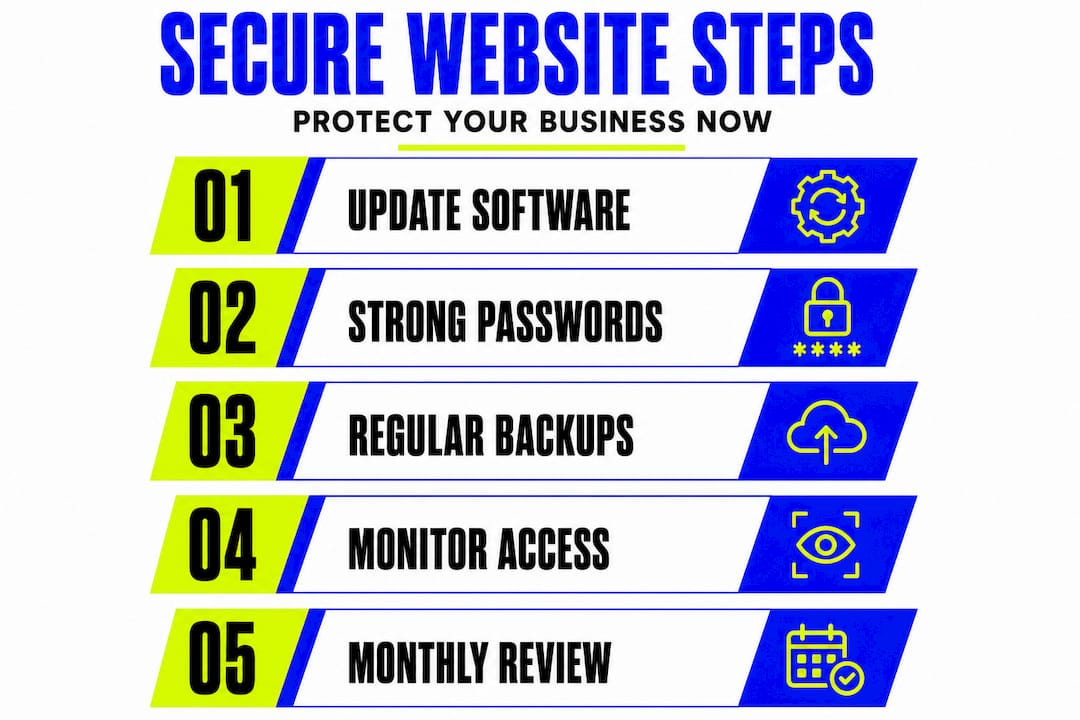
- Audit your current software. List every plugin, theme, app, and platform your website relies on. Check each one for available updates and apply them immediately.
- Change all default credentials. Log in to your hosting account, your CMS, and any third-party tools. Replace every default username and password with something strong and unique.
- Enable two-factor authentication. Add this to your CMS admin login and your hosting control panel. Even if a password is stolen, attackers cannot get in without the second verification step.
- Install an SSL certificate. If your website still shows “http://” rather than “https://”, fix this today. SSL encrypts data in transit between your site and your visitors. It also signals trust to both customers and search engines.
- Set up regular backups. Schedule automated daily or weekly backups stored somewhere separate from your main hosting environment. If your site is compromised, a recent backup is your fastest route to recovery.
- Review user accounts. Remove anyone who no longer needs access. Downgrade permissions for users who only need limited access. Audit this list every quarter.
- Install a reputable security plugin or tool. For WordPress sites, tools that monitor for suspicious activity, scan for malware, and enforce login restrictions provide an important early warning system.
- Test your contact forms and data handling. Ensure that any personal data collected through your website is handled securely, stored appropriately, and covered by a clear privacy policy.
Pro Tip: Schedule a monthly “security check” in your calendar, just twenty minutes to review logins, check for updates, and confirm your backups ran successfully. Consistency beats complexity every time.
Good website design tips often align with security best practice, because a well-structured, clean site is easier to maintain and monitor. Security also affects your SEO and overall visibility; Google’s ranking signals include HTTPS status and the absence of malware. Securing your site is not a defensive act alone; it actively supports your growth. For businesses wanting professional support, IT security services can provide specialist guidance tailored to your specific infrastructure.
The uncomfortable truth: website security is a continuous operation, not a one-off
Here is something most guides do not tell you plainly enough. Many small businesses carry out a round of security improvements after reading an article just like this one, and then they do not revisit it for two years. By then, the plugins are outdated, the former employee still has admin access, and the backup schedule stopped working three months ago without anyone noticing. That is not a failure of knowledge. It is a failure of process.
Cyber Essentials guidance implies a need for ongoing maintenance rather than a single implementation. The language throughout the framework is about maintaining controls, not simply setting them up. This is a vital distinction. A firewall misconfigured after a software update is no longer protecting you. An access control list that has not been reviewed since last year is not actually controlling access.
The businesses that handle security well are not necessarily the ones with the biggest budgets or the most technical expertise. They are the ones that treat security as an operational habit, something woven into their regular routine the same way invoicing or stock checking is. The mindset shift is from “we have sorted our security” to “we are continuously managing our security.”
This is particularly relevant for small businesses managing their own websites. When you are also handling sales calls, fulfilling orders, and writing social media posts, website security can feel like a low-priority background task. It is not. A single breach can cost you more time, money, and customer confidence than six months of careful maintenance would ever have demanded.
Think about your website the way you think about your premises. You would not leave the front door unlocked at night simply because nothing bad had happened yet. The same logic applies online. Streamlining your website workflow can make routine security checks feel far less burdensome, embedding them into a reliable rhythm that protects your business without eating your day.
How Kukoo Creative supports your business security and brand trust
If you’re ready to make security a foundation for your brand’s trust and long-term success, expert support can make all the difference.
At Kukoo Creative, we have spent over a decade helping small UK businesses build websites that work hard and stand strong. Security is not an afterthought in our process; it is built into the foundations from day one.

Whether you need a new website designed with security best practice baked in, or you want to review and strengthen your existing site, we are here to help. Our brand workflow solutions and web design process are built around creating credible, trustworthy digital presences that attract customers and keep them safe. A secure website is a confident website, and a confident website builds the kind of brand that thrives. Let us help you build yours.
Frequently asked questions
Is Cyber Essentials certification required for my small business website?
Cyber Essentials certification is not mandatory for all businesses, but it is strongly recommended as the UK Government’s minimum standard for cyber protection. If you handle sensitive customer data or supply public sector contracts, it is often a requirement.
How often should I review my website security settings?
Website security settings should be reviewed at least every quarter and immediately after any major software updates, team changes, or incidents. Cyber Essentials highlights the need for continuous maintenance rather than a one-off approach.
What is the first thing I should do to improve my website’s security?
Start by ensuring your website runs on up-to-date software with strong, unique passwords across all user accounts. Keeping software updated and restricting access are among the most impactful and immediately actionable Cyber Essentials controls.
What are the financial consequences of a website breach for small businesses?
Breaches can lead to significant downtime, reputational damage, and unplanned recovery costs, all of which can be disproportionately damaging for smaller businesses. Incidents can cause downtime, reputational damage, and extra costs that strain cash flow and undermine customer relationships at a critical time.