
TL;DR:
- Clear website structure boosts user engagement and reduces bounce rates for small businesses.
- A flat site architecture with 5-7 main sections is ideal for easy navigation and SEO.
- Regular reviews and continuous improvement of site navigation prevent structural decay and maintain effectiveness.
Imagine landing on a website and not being able to find the contact page, the pricing, or even what the business actually does. Frustrating, isn’t it? You click away within seconds. Your potential customers do exactly the same thing. Poor information architecture causes 50% of users to struggle with navigation, while a well-organised site can reduce bounce rates by 40%. For UK small businesses, that gap between a confused visitor and a paying customer often comes down to one thing: website structure. This guide gives you a practical, step-by-step plan to get it right.
Table of Contents
- Assessing your goals and requirements
- Choosing the best site structure for small businesses
- Organising logical navigation and internal linking
- Content placement and verification
- Why small business website structure needs continuous attention
- Get expert help for your website structure
- Frequently asked questions
Key Takeaways
| Point | Details |
|---|---|
| Flat structure works best | Keeping site sections within 1-2 clicks improves user experience and SEO. |
| Logical menus boost engagement | Clear navigation and internal linking help visitors find information fast. |
| Verify and adapt | Regular audits and feedback ensure your website stays relevant and effective. |
| Start with business goals | Planning around your key objectives helps structure your site for real results. |
Assessing your goals and requirements
Before you touch a single page or menu, you need to be clear on what your website is actually supposed to do. This sounds obvious, but it’s the step most small business owners skip. They jump straight into design and end up with a site that looks decent but converts nobody.
Start by listing your core business objectives. Are you trying to generate leads? Sell products directly? Take bookings? Share expertise through a blog? Each goal shapes a completely different site structure. A local plumber needs a prominent contact form and a services page. An e-commerce brand needs category pages and a smooth checkout. Getting this wrong from the start means rebuilding later, which costs time and money.
Next, think about your visitors. Who are they, and what journey do they take? A first-time visitor might land on your blog, then check your About page, then look at Services before contacting you. Map those journeys out. When you streamline website workflow from the planning stage, you avoid costly structural reworks down the line.
Clear information architecture measurably boosts engagement and reduces bounce rates, which means getting your requirements right at the start pays dividends across every page.
Here is a summary of core requirements common to UK small business websites:
| Requirement | Purpose | Priority |
|---|---|---|
| Contact form | Lead capture and enquiries | High |
| Services or products page | Showcase what you offer | High |
| About page | Build trust and credibility | High |
| Blog or news section | SEO and authority building | Medium |
| Gallery or portfolio | Visual proof of quality | Medium |
| Testimonials section | Social proof | Medium |
| Privacy policy and cookies | Legal compliance (UK GDPR) | High |
Common goal categories for UK small business websites include:
- Lead generation: Capturing enquiries via forms or calls
- Online sales: Selling products or services directly
- Brand awareness: Establishing credibility in your local market
- Booking and appointments: Enabling clients to schedule directly
- Information sharing: Educating customers through content
Pro Tip: Send a quick three-question survey to five of your best customers before you plan your site. Ask them what they look for first on a business website, what puts them off, and what would make them get in touch. The answers will shape your structure better than any template.
Choosing the best site structure for small businesses
Once goals are clear, the next step is selecting a structure that supports both your business and your visitors. The two main approaches are flat and deep site architectures, and for most UK small businesses, the choice is straightforward.
Flat architectures are preferred for SMBs because they are easier for users to navigate and more scalable for SEO. A flat structure keeps pages close to the home page, reducing the number of clicks needed to reach any key content. A deep structure, by contrast, buries pages several layers down, which frustrates users and dilutes your SEO value.
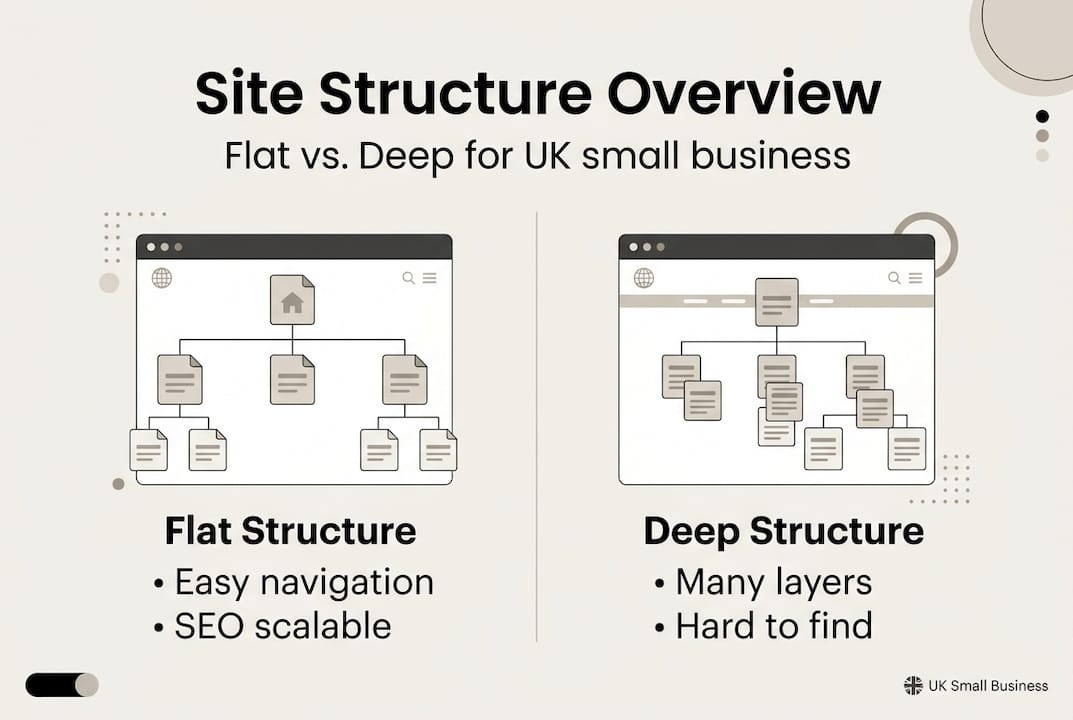
| Feature | Flat structure | Deep structure |
|---|---|---|
| Click depth | 1 to 2 clicks from home | 3 or more clicks from home |
| Best for | SMBs, local businesses | Large e-commerce, enterprise |
| SEO impact | Strong, link equity flows well | Can dilute authority on deep pages |
| User experience | Simple and intuitive | Can feel complex or overwhelming |
| Scalability | Easy to add new pages | Requires careful planning to expand |
For most small businesses, a flat structure with five to seven main sections works brilliantly. Pair this with solid website design tips and you have a strong foundation.
Here is how to map your major sections:
- Start with your home page as the central hub, linking to all primary sections.
- Define your core pages: About, Services (or Products), Blog, and Contact as minimum essentials.
- Group related content under logical parent pages to avoid clutter in the main menu.
- Assign a clear purpose to each page before creating it, so nothing is redundant.
- Test your map by asking a colleague to find key information using only your planned navigation.
If you want a deeper look at how professionals approach this, our web design process guide walks through each stage in detail.
Pro Tip: Keep every important page within two clicks of your home page. If a visitor has to click more than twice to find your contact details or main service, you are losing enquiries. Simplicity wins every time.
Organising logical navigation and internal linking
After establishing overall structure, it is vital to ensure users can easily find what they need. Navigation is the signposting of your website. Get it wrong and visitors wander. Get it right and they move confidently towards becoming customers.

Clear menu labels matter enormously. Avoid clever or vague labels like “Our World” or “Explore.” Use plain, descriptive words: Services, About, Contact, Blog. Visitors scan menus in under two seconds. They need to understand instantly where each link leads. Placement matters too. Your main navigation should sit at the top of every page, and your contact details should appear in the header or footer consistently.
Internal linking is equally powerful. When a blog post about your services links naturally to your Services page, you guide users deeper into your site and signal relevance to search engines. Our web design services team builds these pathways deliberately, not as an afterthought.
Best practices for menu organisation:
- Limit your main menu to five to seven items to avoid overwhelming visitors
- Use dropdown menus sparingly and only when genuinely needed
- Include a clear call-to-action button (such as “Get a quote” or “Book now”) in the header
- Ensure your menu works flawlessly on mobile, where most UK users browse
- Audit internal links regularly to catch and fix broken links before they damage trust
Key insight: 50% of users report difficulty navigating websites with poor information architecture. Clear, logical navigation directly increases user retention and reduces bounce rates. Every confusing menu is a lost customer.
Common pitfalls to avoid include hiding key pages in footer-only links, using jargon-heavy labels, and neglecting to maintain and improve your website as your content grows. A site that made sense at launch can become a maze within a year if nobody tends to it.
Content placement and verification
With navigation sorted, let’s turn to how your site content should be positioned and assessed for impact. Even a perfectly structured site can underperform if key content sits in the wrong place.
Standard placements for key pages follow well-established user expectations. Your Contact page should always be accessible from the main menu and ideally linked from every service page. Your About page should be prominent because trust is everything for UK small businesses. Services pages should be reachable within one click from the home page, with clear descriptions and calls-to-action on each.
Verification is where many businesses fall short. Building the site is only half the job. You need to confirm it actually works for real users.
Follow these steps to verify your site structure:
- Conduct user testing: Ask three to five people unfamiliar with your business to find specific information on your site and observe where they hesitate.
- Review analytics: Use Google Analytics or a similar tool to identify pages with high bounce rates or short visit times, which signal structural problems.
- Run a site health audit: Tools like Google Search Console flag crawl errors, broken links, and indexing issues that affect both users and search rankings.
- Check mobile usability: Test every page on a smartphone. Poor responsive design is one of the fastest ways to lose visitors.
- Gather iterative feedback: After launch, keep asking customers how they found the experience. Small tweaks based on real feedback compound into significant improvements.
Statistic to remember: Clear content placement and structured verification processes can reduce bounce rates by up to 40%, keeping more visitors engaged long enough to convert.
Pro Tip: Before you launch, use a free tool like Hotjar’s basic plan to record visitor sessions. Watching real users navigate your site reveals problems no checklist ever could.
Why small business website structure needs continuous attention
Here is something most web design guides won’t tell you: launching a well-structured website is not the finish line. It is the starting point.
The uncomfortable truth is that most UK small businesses treat their website like a printed brochure. They build it, publish it, and move on. But user behaviour changes. New services get added. Blog content accumulates. And slowly, without anyone noticing, the structure that once felt clean becomes cluttered and confusing.
We have seen this pattern repeatedly over a decade of working with business owners. A site that converted brilliantly in year one quietly starts underperforming by year two, not because the design aged, but because nobody tended the structure.
Our honest advice: review your navigation quarterly. After every major update, whether you add a new service, run a campaign, or publish a batch of blog posts, check that your menus still make sense and your internal links still flow logically. Use your website improvement guide as a reference point.
Pro Tip: Schedule a 30-minute structure audit into your calendar every quarter. It costs almost nothing and consistently prevents the kind of structural drift that quietly costs you customers.
Get expert help for your website structure
If you want to ensure your business site stays ahead and avoids costly structural mistakes, here is where we can help. At Kukoo Creative, we have spent over a decade helping UK small business owners build websites that are not just beautiful but genuinely effective.

We know that a strong website starts long before the design stage. It starts with understanding your goals, your customers, and your brand. From logo design impact to full site builds, we bring structure and creativity together. Explore our web design process guide to see how we approach every project, or browse our web design portfolio to see the results we deliver for businesses just like yours. Let’s build something extraordinary together.
Frequently asked questions
What is the best site structure for a small business?
A flat structure works best, keeping every major section within one to two clicks from the home page. Flat site structures are easier for users, preferred for SMBs, and support scalable SEO growth.
How do I decide what pages to include?
List your key goals such as sales or bookings, research what your customers expect, and prioritise essential pages: Home, About, Services, Contact, and Blog. Clear information architecture measurably improves engagement from the moment visitors arrive.
What are common mistakes in website structure?
Hidden pages, confusing menu labels, and broken internal links are the most frequent errors. 50% of users struggle with poor organisation, so regular audits are essential to keep your site working well.
How often should I review my site structure?
Check your structure quarterly and after every major update or redesign. Monitoring analytics helps you spot early warning signs, such as rising bounce rates, before they become serious problems.