
TL;DR:
- Visual hierarchy organizes design elements by importance to guide viewer attention effectively. It relies on size, contrast, typography, colour, spacing, and positioning to create a clear reading order and reduce confusion. Proper application of these principles enhances content comprehension, user engagement, and conversion rates across digital and print media.
Visual hierarchy is the deliberate arrangement of design elements so viewers perceive and process information in order of importance. As Squarespace defines it, hierarchy uses signals like size, scale, contrast, typography, spacing, and positioning to answer key visitor questions about what to read first, what matters most, and where to look next. For designers and marketers, understanding visual hierarchy is not a stylistic preference. It is the structural backbone of every effective communication, from a landing page to a printed brochure.
What is visual hierarchy and why does it matter?
Visual hierarchy is the principle that organises design elements from most important to least important, making compositions easier to understand and more effective as communication tools. Without it, every element on a page competes for attention equally, and the viewer is left to figure out the reading order alone. That confusion costs you conversions, engagement, and trust.
The importance of visual hierarchy becomes clear the moment you consider how people actually consume content. They scan, not read. They make snap judgements about relevance within seconds. A well-structured layout guides users from curiosity to action, reducing friction at every step. A poorly structured one sends them elsewhere.
Three named authorities consistently shape how the industry understands this principle. Squarespace frames hierarchy as a virtual roadmap for the eye. Coveo connects it directly to UX outcomes. Shopify applies it to e-commerce conversion. Each perspective confirms the same truth: visual hierarchy is not decoration. It is function.
What are the key elements that create visual hierarchy?
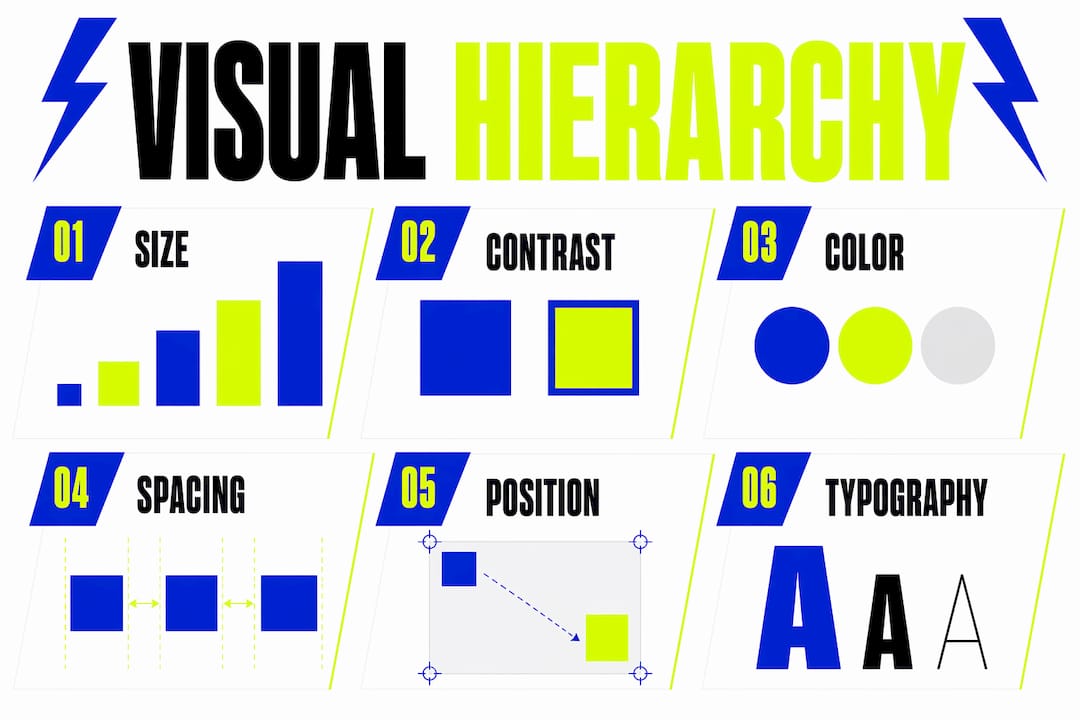
Coveo describes visual hierarchy as creating a virtual roadmap for the viewer’s eye using size, contrast, typography, and spacing. Each of these elements carries a specific kind of visual weight, and understanding how they work individually helps you combine them with intention.
The core elements are:
- Size and scale. Larger elements attract attention first. A bold headline at 48px commands the eye before body copy at 16px. This is the most instinctive hierarchy signal.
- Contrast. High contrast between text and background, or between a call-to-action button and its surroundings, draws the eye immediately. Low contrast recedes.
- Typography. Font weight, style, and size create a clear reading order. A bold H1, a medium-weight H2, and regular body text form a natural three-tier hierarchy.
- Colour. Warm or saturated colours advance visually; cool or muted tones recede. Using a single accent colour for primary actions is one of the most reliable hierarchy tools in marketing design.
- Spacing and proximity. Spacing communicates relationships between elements, improving scannability and reducing cognitive load. Elements grouped closely together read as related; elements separated by white space read as distinct.
- Positioning. Content placed at the top or centre of a layout receives more attention than content placed at the edges or below the fold.
Pro Tip: When balancing contrast and colour, test your design in greyscale first. If the hierarchy still reads clearly without colour, you have built it on solid structural foundations. Colour then becomes an enhancement, not a crutch.
These elements do not work in isolation. A large headline with poor contrast fails. A well-spaced layout with inconsistent typography confuses. The principles of visual hierarchy work because they combine to form a coherent perceptual order, one that feels intuitive to the viewer precisely because it has been designed with care.
How do eye movement patterns influence layout design?
Designers use two primary eye movement patterns to structure layouts: the F-pattern and the Z-pattern. Shopify confirms that these patterns mimic the natural direction of a person’s eye movements, and layouts that align with them feel effortless to navigate.
| Pattern | Best used for | How it works |
|---|---|---|
| F-pattern | Text-heavy pages, blogs, news sites | Eyes scan across the top, then down the left edge, with shorter horizontal scans lower on the page |
| Z-pattern | Landing pages, ads, simple layouts | Eyes move across the top, diagonally to the bottom left, then across to the bottom right |
The F-pattern explains why left-aligned navigation, prominent headlines, and subheadings placed at the start of paragraphs perform so well on content-heavy pages. Readers naturally return to the left margin after each scan. Placing key information there means it gets seen even by users who are skimming.
The Z-pattern suits layouts with fewer text blocks and a clear call to action. A homepage hero section is a classic Z-pattern application: logo top left, navigation top right, headline and subheading in the middle, and a CTA button at the bottom right. The eye travels the Z and lands exactly where you want it.
Layouts that mimic natural eye movement boost user engagement and content comprehension. This is not a theoretical claim. It is observable in A/B test results across e-commerce, SaaS, and editorial design. If you want to explore how these patterns appear in real projects, the visual branding examples from Kukoocreative show both patterns applied across agency and creative sector websites.
What are common mistakes when applying visual hierarchy?
The most frequent errors in visual hierarchy are not dramatic failures. They are quiet inconsistencies that accumulate and erode the viewer’s confidence in your design.
- Mismatching visual and semantic structure. A heading that looks like body text, or body text styled to look like a heading, creates a mismatch between visual hierarchy and semantic structure that causes accessibility issues and confuses screen readers. Visual prominence and HTML heading order must align.
- Overusing visual weight. When everything is bold, nothing is bold. Designers who apply high contrast, large type, and saturated colour to too many elements cancel out the hierarchy entirely. The viewer has no clear entry point.
- Spacing errors that confuse groupings. Inconsistent padding and margin values make it unclear which elements belong together. A label that sits equidistant between two form fields, for example, reads as ambiguous. Proximity must be deliberate.
- Burying the primary action. Visual weight mismatches in UI components, such as a less prominent primary action button, directly harm conversion rates. If your CTA blends into the page, users will not click it, regardless of how compelling the copy is.
- Ignoring hierarchy on mobile. A layout that reads clearly on desktop often collapses into a confusing stack on mobile. Hierarchy must be tested at every breakpoint, not assumed to translate automatically.
Pro Tip: Audit your existing designs by printing them out and squinting. The elements that remain visible when blurred are the ones carrying the most visual weight. If those are not your most important elements, your hierarchy needs rebalancing.
Visual hierarchy prevents choice paralysis by creating a clear, scannable path through information. When that path is broken by any of the mistakes above, users feel overwhelmed and disengage. The fix is almost always simpler than designers expect: reduce the number of competing elements, not add more.
How to apply visual hierarchy in digital and marketing projects
Applying the principles of visual hierarchy consistently across a project requires a system, not just good instincts. Ad hoc decisions produce inconsistent results. Systematic use of type scales, colour tokens, and spacing ensures consistent hierarchy across interfaces and makes designs easier to maintain and scale.
Here is how to build that system in practice:
- Define a type scale. Choose a modular scale (such as 1.25 or 1.333) and apply it to every heading and body text size. This creates mathematical harmony between levels and removes guesswork from typographic decisions.
- Use colour tokens for hierarchy roles. Assign specific colours to specific roles: one for primary actions, one for secondary information, one for body text, one for disabled states. Never deviate from these assignments.
- Apply the 60-30-10 colour rule. Sixty per cent of your layout uses a dominant neutral, thirty per cent a secondary colour, and ten per cent an accent. This keeps visual weight concentrated where you want it.
- Prioritise spacing as a hierarchy tool. Using spacing strategically to create visual separation and grouping helps users read interfaces by scanning rather than reading exhaustively. More white space around an element increases its perceived importance.
- Make your CTA the most visually prominent element on the page. Size, colour, contrast, and position should all point to it. Strong visual hierarchy promotes brand trust and deeper engagement, and a confident CTA is the clearest expression of that.
- Test with real users. Tools like Hotjar and Maze reveal where users actually look and click, which often differs from where designers assume they will. Use this data to iterate on your hierarchy decisions.
For a practical look at how these principles translate into professional web design, Kukoocreative’s guide on web page design and user experience covers hierarchy application in detail. If you are evaluating which design tools support this kind of systematic approach, the graphic design tools comparison for 2026 is worth reviewing.
Key takeaways
Visual hierarchy is the single most powerful structural tool in design and marketing, because it determines what your audience sees, understands, and acts on before they read a single word.
| Point | Details |
|---|---|
| Definition and purpose | Visual hierarchy arranges elements by importance to guide attention and improve communication clarity. |
| Core elements | Size, contrast, typography, colour, spacing, and positioning each carry visual weight and must work together. |
| Eye movement patterns | F-pattern suits content-heavy pages; Z-pattern suits landing pages and simple marketing layouts. |
| Common mistakes | Overusing visual weight, mismatching semantic structure, and burying CTAs all reduce hierarchy effectiveness. |
| Systematic application | Type scales, colour tokens, and deliberate spacing create consistent, scalable hierarchy across any project. |
Why visual hierarchy is more than a design principle
After more than a decade working on brand and web design projects at Kukoocreative, I have come to see visual hierarchy as the single most misunderstood concept in our field. Most designers know what it is. Far fewer apply it with the rigour it deserves.
The mistake I see most often is treating hierarchy as a finishing touch rather than a structural decision made at the very start of a project. Designers build a layout, add content, and then try to impose hierarchy on top of it. That approach always produces compromises. Hierarchy has to be designed in from the first wireframe, not retrofitted after the fact.
The other thing I would push back on is the idea that strong hierarchy means conservative design. Some of the most visually striking work I have seen uses bold, unconventional layouts that still guide the eye with absolute clarity. Creativity and usability are not in opposition. They reinforce each other when hierarchy is treated as a creative constraint rather than a limitation.
My honest advice: spend as much time on your spacing and type scale as you do on your colour palette. Those decisions are invisible when done well and glaring when done poorly. Get them right, and everything else in your design will feel more confident and more credible.
— Kukoo
Ready to put visual hierarchy to work for your brand?
At Kukoocreative, we have spent over a decade building designs that do not just look fantastic. They communicate with clarity, guide attention with purpose, and convert visitors into loyal customers. Every logo, website, and marketing asset we create is built on a foundation of strong visual hierarchy.

Whether you are starting from scratch or refining an existing brand, we bring the same systematic approach to every project. If you want to understand how logo design shapes your brand and how hierarchy plays a central role in that process, we would love to talk. Get in touch with the Kukoocreative team and let us build something extraordinary together.
FAQ
What is visual hierarchy in simple terms?
Visual hierarchy is the arrangement of design elements so that the most important information is seen first. It uses size, contrast, colour, and spacing to create a natural reading order for the viewer.
Why is visual hierarchy important in web design?
Visual hierarchy guides users from curiosity to action by making key content and next steps impossible to ignore. Without it, users feel overwhelmed and are more likely to leave a page without converting.
What are the main principles of visual hierarchy?
The main principles are size and scale, contrast, typography, colour, spacing and proximity, and positioning. Each principle contributes visual weight to an element, and together they create a clear perceptual order.
How does the F-pattern differ from the Z-pattern?
The F-pattern describes how users scan text-heavy pages by reading across the top and then down the left edge. The Z-pattern describes how users move across a simple layout diagonally, making it ideal for landing pages and advertisements.
How do I audit visual hierarchy in an existing design?
Print your design and squint at it. The elements that remain visible when blurred carry the most visual weight. If those are not your most important elements, reduce competing visual signals and rebalance contrast, size, and spacing accordingly.