
TL;DR:
- A sitemap is a structured file or page that helps search engines discover important website pages and assists user navigation. Different types like HTML and XML serve distinct audiences, with technical best practices crucial for effective implementation and management at scale.
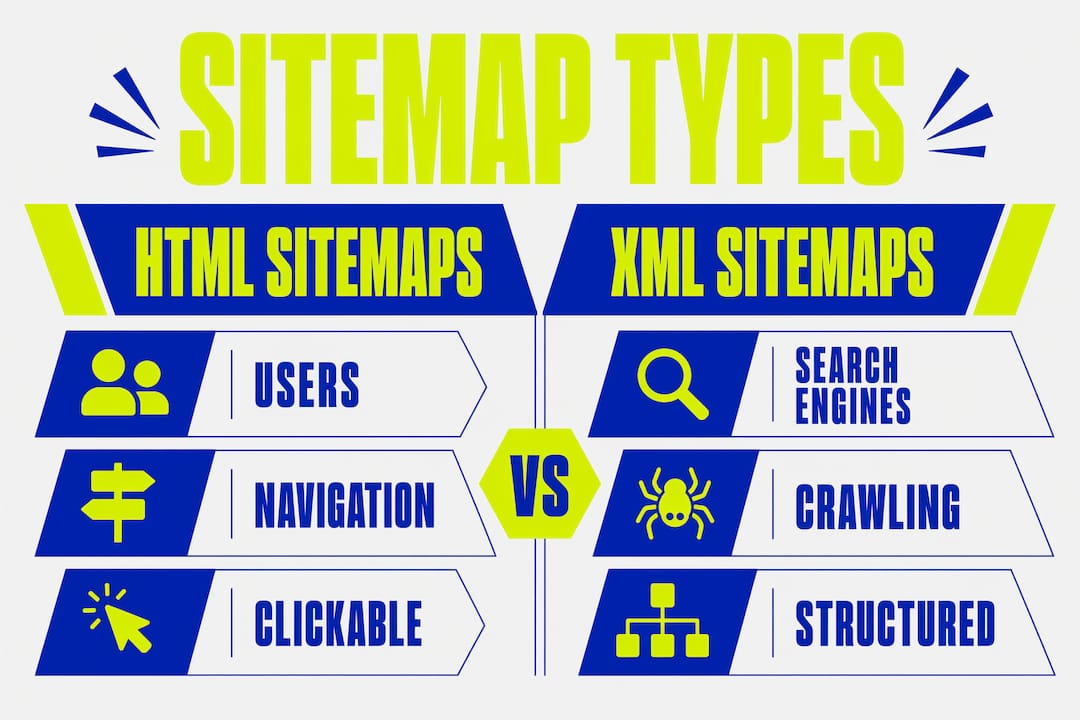
A site map is a structured file or page that lists a website’s important URLs and their hierarchy, serving both user navigation and search engine indexing. The two primary formats are HTML sitemaps for human visitors and XML sitemaps for search engine crawlers. Both formats are supported by all major search engines, including Google, Bing, Yahoo, and Yandex. Understanding the definition of a site map is the first step toward building a website that search engines can index efficiently and users can navigate with confidence.
What is a site map and what types exist?
Site maps come in two distinct categories, each built for a different audience. HTML sitemaps are human-readable pages, typically linked from a website’s footer, that list key pages in a logical structure. They support accessibility and help visitors find content when standard navigation fails them. XML sitemaps are machine-readable files that tell crawlers which pages exist, when they were last updated, and how they relate to each other.
Within the XML format, several subtypes serve specific content types:
- XML sitemaps list standard web pages and are the most common format.
- Image sitemaps help Google discover images that might otherwise be missed by crawlers.
- Video sitemaps provide metadata about video content, improving visibility in video search results.
- News sitemaps are used by publishers to surface recently published articles in Google News.
- Sitemap index files act as a master file referencing multiple individual sitemaps, used when a site exceeds 50,000 URLs or the 50MB file size limit.
| Type | Audience | Primary purpose | Typical use case |
|---|---|---|---|
| HTML sitemap | Human visitors | Navigation and accessibility | All websites |
| XML sitemap | Search engine crawlers | Page discovery and indexing | All websites |
| Image sitemap | Search engine crawlers | Image discovery | Photography, e-commerce |
| Video sitemap | Search engine crawlers | Video metadata | Media, course platforms |
| News sitemap | Search engine crawlers | News article indexing | Publishers, news sites |
| Sitemap index | Search engine crawlers | Managing multiple sitemaps | Large or enterprise sites |
Choosing the right type depends on your content. A small business site needs a standard XML sitemap and an HTML sitemap. A large e-commerce platform with tens of thousands of product pages needs a sitemap index file to stay within protocol limits.
How does a site map improve SEO and user experience?
A site map is a wayfinding signal. It tells search engines where to focus their crawl budget, directing them toward your most important canonical pages rather than wasting resources on low-value URLs. This is particularly valuable for new websites, deep pages with few internal links, and large sites where crawlers might not discover every page organically.
SEO benefits of a well-maintained XML sitemap:
- Faster indexing of new or updated pages
- Improved crawl efficiency by signalling page priority
- Cleaner crawl signals by excluding redirects, 404s, and duplicate content
- Support for local SEO rankings when combined with structured site architecture
User experience benefits of an HTML sitemap:
- Provides a fallback navigation path for users who cannot find a page
- Supports screen readers and assistive technologies
- Improves internal linking structure, which indirectly benefits SEO
- Helps visitors understand the full scope of your website’s content
A well-structured website benefits from both formats working together. The XML sitemap handles machine discovery. The HTML sitemap handles human accessibility. Neither replaces good internal linking, but both reinforce it.
Pro Tip: Do not rely on your sitemap to compensate for poor internal linking. A sitemap guides crawlers to pages; internal links pass authority between them. You need both.

Technical requirements for creating a correct XML sitemap
Getting the technical details right is non-negotiable. An incorrectly formatted sitemap is ignored by crawlers, which defeats the purpose entirely.
- Encode in UTF-8. Every XML sitemap must be UTF-8 encoded to be valid. Any other encoding risks parsing errors.
- Place the file at the root domain. Your sitemap should live at
https://yourdomain.com/sitemap.xml. Crawlers look there first. - Declare it in robots.txt. Add
Sitemap: https://yourdomain.com/sitemap.xmlto your robots.txt file so all crawlers can locate it immediately. - Include the
locelement for every URL. Theloctag is the only mandatory element in the sitemap protocol. It contains the full canonical URL of each page. - Use accurate
lastmoddates. Google’s John Mueller confirms that accurate lastmod values significantly improve crawl efficiency. Use the W3C datetime format (YYYY-MM-DD). - Respect the 50,000 URL and 50MB limits. A single sitemap file cannot exceed these thresholds. Use a sitemap index file if your site grows beyond them.
- Exclude non-canonical and broken URLs. Only include URLs that return a 200 OK status and carry a canonical tag pointing to themselves.
| Element | Required | Format | Notes |
|---|---|---|---|
loc |
Yes | Full URL | Must be canonical and return 200 OK |
lastmod |
Recommended | YYYY-MM-DD | Improves crawl efficiency |
changefreq |
Optional | daily, weekly, etc. | Largely ignored by Google |
priority |
Optional | 0.1 to 1.0 | Largely ignored by Google |
Pro Tip: Set lastmod only when content genuinely changes. Updating it artificially on every page signals inaccurate data to crawlers and reduces trust in your sitemap over time.
The changefreq and priority tags are widely misunderstood. Google does not use them as ranking signals. Including them adds no SEO value and can create a false sense of control. Focus your effort on loc and lastmod accuracy instead.
Common pitfalls and misconceptions about site maps
The biggest misconception about sitemaps is that submitting one will improve your rankings. A sitemap is not a direct ranking factor. It is a discovery tool. It tells search engines where your pages are. What happens after discovery depends entirely on the quality of those pages.
Common errors to avoid:
- Including redirected URLs. A URL that redirects to another page should never appear in your sitemap. It sends conflicting signals to crawlers.
- Listing 404 pages. Including broken URLs wastes crawl budget and signals poor site maintenance.
- Adding non-canonical pages. If a page has a canonical tag pointing elsewhere, exclude it. Only canonical pages belong in a sitemap.
- Bloating the sitemap with every URL. Auto-generated tag pages, filtered URLs, and paginated archives rarely deserve sitemap inclusion. Curate your sitemap to focus on high-value pages.
- Treating
changefreqandpriorityas ranking levers. These tags are largely disregarded by Google and Bing. They do not influence how often your pages are crawled.
A bloated or outdated sitemap provides noisy data to crawlers. This risks indexing delays and inefficient crawling, particularly as AI-driven search technologies become more prevalent. Think of your sitemap as a curated list, not an exhaustive archive.
Pro Tip: Audit your sitemap quarterly. Remove any URL that has been redirected, deleted, or de-indexed. A clean sitemap of 500 high-quality pages outperforms a bloated one of 5,000 mixed-quality URLs.
How to scale site maps for large and multilingual websites
Large websites and multilingual sites require a more structured approach to sitemap management. The standard single-file sitemap breaks down quickly when you cross the 50,000 URL threshold.
Managing large sites with sitemap index files
A sitemap index file is a master XML file that references multiple individual sitemaps. Each referenced sitemap must itself stay within the 50,000 URL and 50MB limits. CMS plugins can automate this segmentation for common platforms. Custom-built architectures must implement it manually, typically by segmenting sitemaps by content type, such as products, blog posts, and landing pages.
Multilingual sitemaps and hreflang markup
Multilingual sites should use hreflang markup within XML sitemaps to signal the correct language and regional variant to search engines. This approach requires no changes to page templates and scales well across large sites with dozens of language variants. Each URL entry in the sitemap includes xhtml:link attributes pointing to all language equivalents.
| Scenario | Solution | Key consideration |
|---|---|---|
| Over 50,000 URLs | Sitemap index file | Segment by content type |
| Multiple languages | hreflang in XML sitemap | Point to all language variants |
| Subdomains | Separate sitemap per subdomain | Each subdomain needs its own robots.txt declaration |
| Large e-commerce | Automated CMS sitemap plugin | Verify plugin excludes non-canonical URLs |
Understanding how to structure a website before you build it makes sitemap management far simpler at scale. A flat, logical URL structure produces cleaner sitemaps and better crawl efficiency than a deeply nested one.
Key takeaways
A site map is infrastructure, not a shortcut. Clean, curated, and accurate sitemaps are the foundation of efficient search engine discovery and a well-organised user experience.
| Point | Details |
|---|---|
| Two core types | HTML sitemaps serve users; XML sitemaps serve search engine crawlers. |
| Technical limits apply | Each XML sitemap file must stay within 50,000 URLs and 50MB uncompressed. |
| Accuracy over volume | Only include canonical URLs returning 200 OK; exclude redirects and broken pages. |
| Lastmod matters | Accurate lastmod dates improve crawl efficiency, especially as AI-driven indexing advances. |
| Scale with index files | Sites exceeding protocol limits must use a sitemap index file to maintain full coverage. |
Why I treat sitemaps as the backbone of every website build
Most developers treat sitemaps as an afterthought. They build the site, then generate a sitemap file as a final checkbox before launch. That approach misses the point entirely.
When I work on a website, the sitemap conversation happens at the architecture stage, not after it. The sitemap forces clarity. If you cannot decide whether a page deserves to be in the sitemap, that is a signal the page may not deserve to exist at all. Curating a sitemap is really an exercise in curating your website’s purpose.
The shift toward AI-driven search has made this even more pressing. Search engines are increasingly relying on precise, updated sitemap data to make rapid indexing decisions. An inaccurate lastmod date or a bloated sitemap full of tag pages is not a minor oversight. It is a credibility signal to the crawler. Clean data builds trust with the algorithm.
My honest advice: treat your sitemap like a living document. Review it after every major content update. Remove pages you have redirected. Add new pages the day they go live. The developers and SEOs who do this consistently see faster indexing and fewer crawl anomalies. Those who do not often wonder why their new content takes weeks to appear in search results.
Sitemaps will not make a bad website rank. But they will make a good website perform to its full potential. That is the right way to think about them.
— Kukoo
How Kukoocreative can help you build a site that search engines love
Getting your site architecture and sitemap right from the start saves significant time and cost further down the line. At Kukoocreative, we have spent over a decade helping business owners build websites that are structured for both users and search engines from day one.

Our web design process covers everything from URL structure and sitemap planning to on-page SEO and user experience. We do not just make websites look fantastic. We build them to perform. If you want a website with a clean architecture that supports long-term visibility, take a look at our design portfolio and get in touch. We would love to help you build something credible and lasting.
FAQ
What is the difference between an HTML and XML sitemap?
An HTML sitemap is a human-readable page listing your website’s key pages for visitor navigation. An XML sitemap is a machine-readable file designed for search engine crawlers to discover and index your pages efficiently.
Does submitting a sitemap improve my Google rankings?
A sitemap is not a ranking factor. It helps Google discover and index your pages faster, but rankings depend on content quality, authority, and technical SEO factors beyond discovery.
How many URLs can an XML sitemap contain?
A single XML sitemap file can contain a maximum of 50,000 URLs and must not exceed 50MB uncompressed. Sites with more URLs require a sitemap index file referencing multiple smaller sitemaps.
Should I include every page of my website in the sitemap?
No. Only include canonical pages that return a 200 OK status. Exclude redirected URLs, 404 pages, paginated archives, and any page with a canonical tag pointing to a different URL.
How do I handle sitemaps for a multilingual website?
Use hreflang markup within your XML sitemap to connect language and regional variants. Each URL entry should reference all language equivalents using xhtml:link attributes, signalling the correct version to search engines without requiring template changes.