
TL;DR:
- Many small businesses underestimate the full scope of website security beyond just HTTPS, risking breaches and reputational damage. Implementing ongoing practices like strong passwords, two-factor authentication, regular updates, backups, and structured testing can significantly enhance protection. Building a security-aware culture and viewing defenses as continuous risk management are essential for long-term resilience and customer trust.
Think website security is just about that little padlock in your browser? You’re not alone — but that assumption could be putting your business at serious risk. 43% of UK businesses experienced a cyber breach or attack in the past 12 months, and small businesses are far from immune. The truth is, website security covers far more ground than most guides let on. This article breaks it all down in plain language — what it really means, what threatens you, and exactly what you should do to protect your customers, your reputation, and your livelihood.
Table of Contents
- What website security means for small businesses
- The biggest threats to your website and how they happen
- Core website security practices: What you must do
- Testing your defences: How to check if your website is secure
- Going further: Responding to vulnerabilities and continuous improvement
- Why website security needs a broader view than most guides offer
- Strengthen your online presence with the right support
- Frequently asked questions
Key Takeaways
| Point | Details |
|---|---|
| Website security is essential | Without proper website security, UK small businesses risk data loss, reputational damage, and legal troubles. |
| Simple steps are powerful | Actions like strong passwords, two-factor authentication, and regular updates dramatically lower the risk of cyber breaches. |
| Testing must be ongoing | Website security isn’t a one-off task; structured, regular checks are needed to stay ahead of new threats. |
| Continuous improvement matters | Reacting to vulnerabilities and improving security processes helps protect your website in the long term. |
| Trust is built with security | Strong website security boosts customer trust, supporting your business reputation and growth online. |
What website security means for small businesses
Website security is not a technical luxury reserved for large corporations. It applies directly to you — your online shop, your booking form, your contact page. At its core, website security is the practice of protecting a website from online threats so it can safely operate and safeguard your business and its data.
But here’s where many small business owners go wrong. They assume that having an SSL certificate (the HTTPS prefix) is enough. It is not. Website security also encompasses:
- The systems your website runs on — your hosting platform, content management system, and any plugins or third-party tools
- The behaviour of your staff — weak passwords, clicking suspicious links, or reusing credentials
- Your processes — how you update software, back up data, and manage user access
- Your legal obligations — data protection laws like UK GDPR place real duties on businesses that handle customer information
When a breach occurs, the consequences are rarely just technical. Customers lose trust. Your reputation takes a hit. And in serious cases, regulatory fines or legal action can follow. Building website essentials for trust is not just about good design — it is about showing customers their data is genuinely safe with you.
“A secure website is one of the most powerful trust signals you can offer to customers. It tells them you take their privacy seriously before they’ve even browsed your products.”
The UK government’s Cyber Essentials introduction programme exists precisely because so many small businesses underestimate this. It offers a clear framework for building basic defences, and it sends a visible signal to customers and partners that you take security seriously.
The biggest threats to your website and how they happen
Now that you understand what website security covers, it’s worth knowing exactly what you’re up against. The most common threats are not exotic, sophisticated hacking operations. Most attacks succeed because of simple, avoidable weaknesses.
Here are the most significant threats UK small businesses face:
- Credential theft — Attackers use phishing emails or data leaked from other breaches to steal usernames and passwords. Once they have your login details, they can access your website’s back end, your email, or your customer database.
- Phishing attacks — Fake emails that look legitimate trick staff into revealing passwords or clicking malicious links. These are increasingly convincing and target businesses of every size.
- Outdated software exploits — If your website’s CMS (content management system, such as WordPress) or plugins are not kept up to date, attackers can exploit known security flaws. These vulnerabilities are often publicly listed online, giving criminals a ready-made roadmap.
- Malware and ransomware — Malicious software can be installed on your website without your knowledge, redirecting your visitors, stealing their data, or locking your files until a ransom is paid.
- Router and network hijacking — This one surprises many business owners. Layered security controls for SMEs must include securing devices like routers to prevent attackers from redirecting your customers to fake login pages. The attack does not have to start on your website at all.
That last point is worth emphasising. Attacks can start via infrastructure like routers and redirect users to convincing fake versions of your site — where their login details, payment information, or personal data are harvested silently. Your site might look perfectly fine on your end, while your customers are being duped.

Pro Tip: Change the default admin password on your business router immediately if you have not already done so. Default router credentials are publicly listed online and are one of the easiest entry points for attackers.
Good UI and security best practices in your website design can also reduce risk — for example, building clear login flows that make phishing attempts more obvious to your customers. Security and design are more connected than most people realise. Planning a business website workflow from the start with security in mind will save you significant time and expense later.
Core website security practices: What you must do
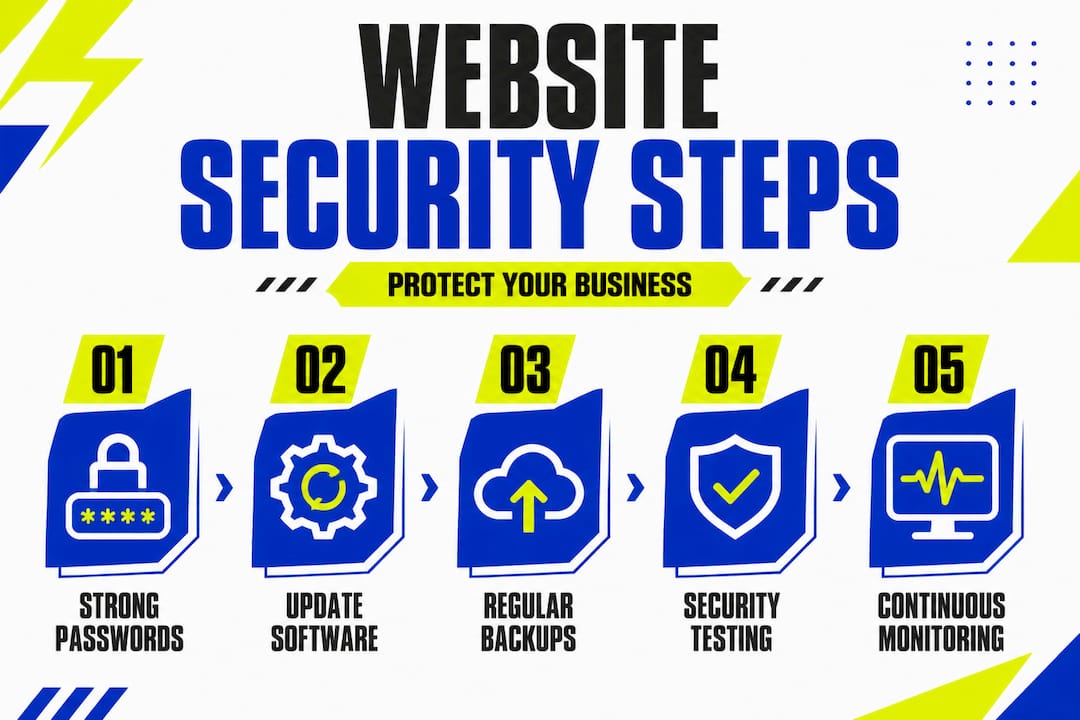
Knowing the risks is one thing — acting on them is another. The good news is that the most impactful steps are straightforward and do not require a dedicated IT team. The NCSC frames cyber security steps as simple actions to build defences against common attacks, positioning them as a starting point toward Cyber Essentials certification.
Here is a clear breakdown of what you should put in place:
| Practice | One-time setup | Ongoing action needed |
|---|---|---|
| Strong, unique passwords | Yes — set them now | Yes — review when staff change |
| Two-factor authentication (2FA) | Yes — enable on all logins | Minimal — monitor access logs |
| Software and plugin updates | Initial audit needed | Yes — check weekly or monthly |
| SSL certificate | Yes — install and verify | Yes — renew annually |
| Regular data backups | Set up automation | Yes — test backups quarterly |
| Staff security awareness | Initial training session | Yes — refresh annually |
Two-factor authentication (2FA) means requiring a second form of verification beyond a password — such as a code sent to a mobile phone. Even if an attacker steals your password, they cannot get in without that second factor. Enabling 2FA on your website admin panel, email accounts, and any third-party tools is one of the highest-impact steps you can take.
Key actions to put in place now:
- Use a password manager to generate and store strong, unique passwords for every account
- Enable automatic updates for your CMS, themes, and plugins wherever possible
- Restrict admin access so only the people who genuinely need it can log into your website’s back end
- Set up regular backups and store them separately from your main server
- Review staff access when team members leave or change roles
Pro Tip: Many web hosting providers offer free or low-cost security scanning tools. Check whether yours does — it could highlight issues you are not aware of without adding cost to your budget.
Good website maintenance habits underpin all of the above. Security is not something you set up once and forget — it needs to be woven into how you manage your site week to week.
Testing your defences: How to check if your website is secure
Building defences is essential. But how do you know they are actually working? This is where many small businesses stall. They assume that because they have taken some steps, they are protected. In reality, defences need to be tested.
A quick automated scan has its place, but it only scratches the surface. OWASP’s Web Security Testing Guide organises testing into phases and categorised test coverage — a structured approach that goes far beyond a one-off scan. OWASP (Open Web Application Security Project) is a globally respected, not-for-profit organisation that publishes free security resources for businesses of all sizes.
A structured testing approach typically covers:
- Information gathering — Understanding what your website exposes publicly, such as server details, file structures, or user information
- Configuration and deployment testing — Checking how your hosting environment is set up and whether it follows security best practices
- Authentication testing — Verifying that your login systems are robust and cannot be easily bypassed
- Input validation testing — Identifying whether your forms and fields can be exploited to inject malicious code
- Error handling — Ensuring your site does not reveal sensitive technical information in error messages
| Testing type | What it checks | Who should do it |
|---|---|---|
| Automated scanning | Known vulnerabilities, outdated software | You or your web host |
| Manual review | Logical flaws, access control gaps | A trusted web developer |
| OWASP-guided testing | Broad, structured coverage | A security specialist |
| Staff phishing simulation | Human response to fake attacks | A managed security provider |
For a reliable web system, testing should not be a once-a-year event. Aim to review your security posture every time you make significant changes to your site — adding new features, switching hosting providers, or bringing on new staff.
If you want to compare options and tools available to you as a small business, a useful overview of cybersecurity solutions can help you weigh up what suits your budget and needs.
Going further: Responding to vulnerabilities and continuous improvement
Testing identifies weaknesses. But true resilience comes from what you do when a problem is found. This is where most small business guides stop short — and where real security improvement begins.
Vulnerability management requires processes for learning from vulnerabilities and ensuring fixes reduce overall exposure, not just patch the single instance. In other words, fixing one broken door is not enough if the same flaw exists elsewhere in your site — or if the same mistake could be made again in future.
What ongoing improvement looks like in practice:
- Document what went wrong — When you find or fix a vulnerability, write down what caused it and how it was resolved. This creates a reference for future decisions.
- Update your processes — If a weak password caused a problem, review your entire password policy, not just the one account.
- Train your staff regularly — Security awareness should be refreshed at least once a year. Threats evolve, and so should your team’s knowledge.
- Work with trusted advisers — A good web developer or security consultant can spot systemic risks you might miss. You do not need to manage all of this alone.
- Report incidents appropriately — If you experience a breach that affects customer data, you may have a legal obligation to report it to the Information Commissioner’s Office (ICO) within 72 hours.
“Security is not a destination. It is a direction. Every improvement you make reduces your risk, even if you can never eliminate it entirely.”
Building a culture of continuous improvement around your website’s scalability and reliability goes hand in hand with security. A well-maintained, robustly built website is harder to attack and faster to recover when issues arise.
Why website security needs a broader view than most guides offer
Here is something most standard guides will not tell you: the biggest security risk to your small business website is almost never the technology itself. It is the gap between what you assume is protected and what is actually being looked after.
The conventional advice — SSL, strong passwords, update your plugins — is necessary. Absolutely necessary. But it is not sufficient. We have worked alongside hundreds of UK small business owners over the years, and the pattern is consistent. Businesses that treat security as a checklist feel covered. Businesses that treat it as an ongoing habit actually are covered.
Think about it this way. Buying a quality lock for your front door is sensible. But if you never check whether the door is properly shut, if staff members have keys they should have returned, or if a window at the back has been left open, the lock alone is not keeping you safe. Website security works the same way.
The most resilient small businesses we see are not necessarily the ones with the most sophisticated tools. They are the ones where the owner has made security a normal part of conversation with their team. Where updating software is as routine as opening the post. Where a suspicious email gets reported rather than clicked.
Investing in building trust with website essentials — both technical and human — pays dividends that a one-time security tool purchase simply cannot match. Culture and process outlast any single solution.
Our perspective: view website security as ongoing risk management, not a box to tick. That shift in mindset is worth more than any plugin you could install.
Strengthen your online presence with the right support
Website security and great design are not separate concerns — they work best together. A professionally built website, designed with security in mind from the ground up, gives your customers confidence and keeps your business protected as it grows.

At Kukoo Creative, we have spent over a decade helping UK small business owners build websites that look fantastic and perform reliably. Our design portfolio shows what is possible when security, usability, and brand identity come together. If you are ready to take your online presence seriously, we would love to help. Explore how UI design for secure sites can make your website a stronger, safer, and more credible asset for your business. Let’s build something you can be proud of — and your customers can trust.
Frequently asked questions
Is website security only about having HTTPS?
No. While HTTPS is important, website security also covers device security, staff behaviour, network settings, and ongoing monitoring — attacks can even begin via routers rather than the website itself.
What is the first security step I should take for my business website?
Enable strong passwords and 2FA on all logins immediately — this single step significantly reduces the risk of credential-based attacks, which are among the most common threats small businesses face.
How often should I test my website’s security?
Test your security regularly and after any significant changes, using both automated tools and structured OWASP methods to ensure broad, meaningful coverage rather than a surface-level scan.
Do small businesses in the UK really face cyber attacks?
Absolutely. 43% of UK businesses experienced a breach or attack in the past 12 months, and small businesses are frequently targeted precisely because their defences tend to be lighter than those of larger organisations.