
TL;DR:
- Many small UK businesses overlook the importance of a structured website review process, leading to underperformance. A comprehensive review examines usability, content, technical health, and conversion factors, prioritising issues based on impact and effort. Embedding brand context into the review ensures optimisation aligns with customer needs, driving genuine growth and increased conversions.
You’ve invested time, money, and real creative energy into your website. So why aren’t visitors converting? For many small UK business owners, the answer isn’t a poor design — it’s a poor review process. Without a structured workflow to assess what’s working and what isn’t, even the most visually impressive sites quietly underperform. This article gives you a clear, step-by-step website review workflow that removes the guesswork, sharpens your brand’s online presence, and turns your site into a genuine engine for business growth.
Table of Contents
- What makes an effective website review workflow?
- Step 1: Define your scope and goals
- Step 2: Systematic checks — UX, usability, and content validation
- Step 3: Technical health — performance and SEO diagnostics
- Step 4: Collate findings and build your action plan
- Why context beats templates: a brand-first review philosophy
- Boost your brand with expert website reviews
- Frequently asked questions
Key Takeaways
| Point | Details |
|---|---|
| Start with clear goals | Defining your review’s objectives ensures every check ties back to real business needs. |
| Use a structured workflow | Systematic checks across usability, content, and technology guarantee nothing critical is missed. |
| Go beyond checklists | Combine expert review with real user and benchmark data for insights that drive action. |
| Prioritise findings by impact | Sort improvements by benefit and urgency to make the most of your resources. |
| Review regularly for ongoing value | Frequent site reviews create a cycle of improvement and keep your brand effective. |
What makes an effective website review workflow?
A website review isn’t just a quick scroll through your homepage. It’s a structured process that examines how your site performs across multiple dimensions: clarity, usability, content quality, technical health, and conversion readiness. Without this structure, reviews become subjective and incomplete. You might fix the font but miss broken forms. You might update the hero image but ignore slow load speeds on mobile.
The inefficiencies caused by an unstructured approach are significant. Common problems include:
- Duplicated effort — different team members reviewing the same pages without coordination
- Missed critical issues — technical errors or broken links going unnoticed because there’s no systematic check
- No prioritisation — every issue treated as equally urgent, leading to paralysis
- Short-term fixes — surface-level changes with no lasting improvement to engagement or conversion
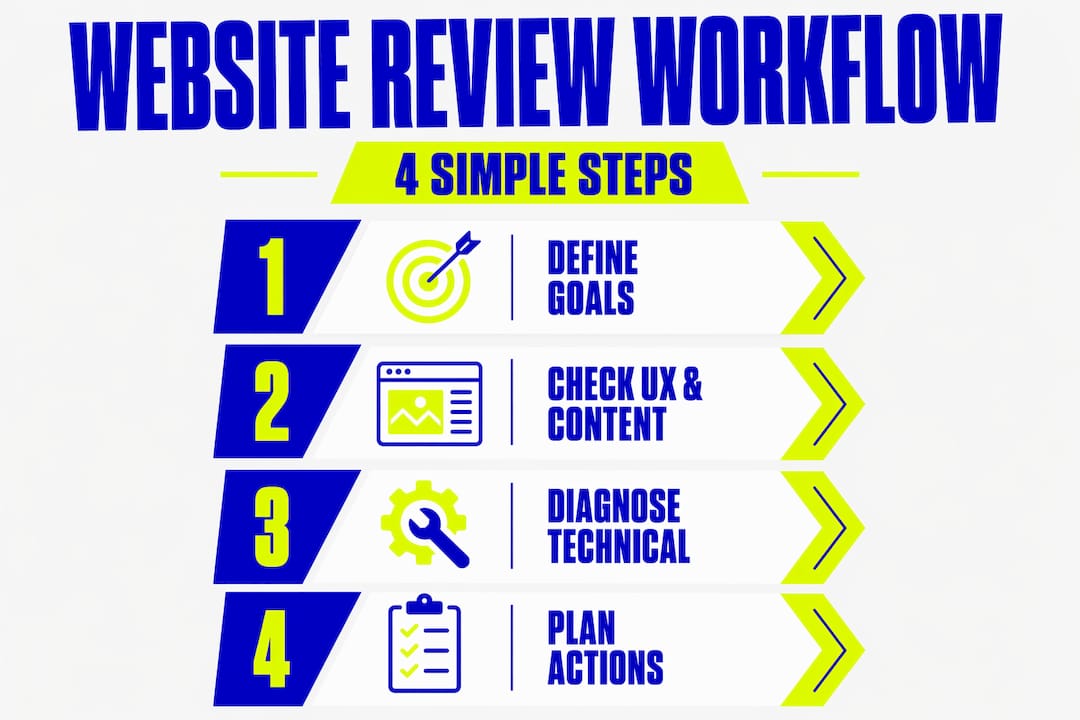
A complete website review guide recommends that a practical workflow should start with scope and objectives, then move through systematic checks covering UX and usability, content and functionality, and performance and technical SEO, before finishing with a prioritised implementation plan.
Here’s a quick comparison of structured versus unstructured review approaches:
| Area | Unstructured review | Structured workflow |
|---|---|---|
| Scope | Ad hoc, no clear boundaries | Defined pages and goals |
| UX check | Subjective opinion | Heuristic criteria and real data |
| Content | Read through once | Validated against business goals |
| Technical | Rarely checked | Speed, SEO, and errors tested |
| Output | Vague notes | Prioritised action plan |
For UK small businesses, getting this right isn’t a luxury. It directly impacts how credible your brand feels and how many visitors become paying customers. Read more about website audits for UK SMEs to understand why regular assessments matter. And if conversion is your goal, our conversion checklist is a brilliant companion resource.
Step 1: Define your scope and goals
Every effective review starts with clarity. Before you open a single page, you need to answer two questions: What are we reviewing? and What do we want to achieve? Without this, your review becomes a wandering exercise that generates noise rather than action.
Start by mapping your most business-critical pages. For most small UK businesses, that means:
- Homepage — first impression, brand messaging, and primary calls-to-action
- Services or product pages — where visitors decide whether to buy or enquire
- Contact page — friction here directly costs you leads
- Blog or content hub — drives organic traffic and builds authority
- Checkout or booking flow — the final step in your conversion funnel
Once you’ve identified the pages, connect each to a business goal. “Improve the services page” is vague. “Increase enquiry form completions from the services page by 20%” is actionable. That specificity shapes every decision that follows.
The complete website review workflow methodology confirms that starting with scope and objectives is foundational, because all later checks, from usability to technical SEO, only make sense when measured against what the business is actually trying to achieve.
If you’re considering a broader overhaul based on your review findings, it’s worth planning a redesign with conversion in mind from the outset.
Pro Tip: Create a simple one-page review brief before you start. List the pages in scope, the primary goal for each, and the person responsible for reviewing each section. This avoids duplication and keeps the whole process moving.
Step 2: Systematic checks — UX, usability, and content validation
Once you’ve set your objectives, it’s time to get hands-on. This is where many business owners fall into a trap: they review based on personal preference rather than established principles. What looks good to you might be confusing to your customers.
A strong usability review follows a clear sequence:
- Walk through key user journeys — simulate what a new visitor would do on your site from arrival to enquiry or purchase
- Check navigation clarity — can visitors find what they need within two or three clicks?
- Assess mobile experience — does every page display correctly and function properly on a smartphone?
- Test all interactive elements — forms, buttons, links, and booking tools must all work correctly
- Review page hierarchy — are headings, subheadings, and calls-to-action in logical order?
One highly effective technique is a heuristic evaluation. This is a fast, low-cost usability review method that compares your site against established usability principles. It’s run by multiple evaluators who document violations and rate their severity. This allows you to prioritise which usability issues to fix first.
“A heuristic evaluation allows teams to uncover usability problems efficiently, without needing to recruit participants for formal testing. The key is documenting each issue with its severity so it can be addressed systematically.”
Here’s how heuristic review compares to real user testing:
| Method | Cost | Speed | Depth of insight | Best for |
|---|---|---|---|---|
| Heuristic evaluation | Low | Fast | Moderate | Early-stage issue finding |
| Real user testing | Higher | Slower | High | Validating specific journeys |
| Analytics review | Low | Medium | Data-driven | Identifying drop-off points |
For maximum effectiveness, combine heuristic evaluation with behavioural data from your analytics. This gives you both a qualitative and quantitative view of usability issues.
Content validation is equally important. Each page should be checked for:
- Accuracy — is all information current and correct?
- Clarity — can a first-time visitor understand your offer within five seconds?
- Call-to-action effectiveness — does every key page guide the visitor to a clear next step?
- Brand voice consistency — does the tone and language feel cohesive across the whole site?
Design-only reviews that focus on visuals without testing functionality routinely miss critical friction points. Broken links, unclear messaging, and confusing navigation are invisible in a screenshot but devastate your conversion rate in practice.
Explore website usability explained for a deeper look at what makes sites genuinely easy to use. For practical guidance on page structure, our article on structuring a business website is an excellent starting point.
Pro Tip: Use a printed or digital checklist when running usability checks. Tick off each item per page. This creates a record you can share with your web developer or designer without losing detail.
Step 3: Technical health — performance and SEO diagnostics
Your site might look polished and feel intuitive. But if it loads slowly, isn’t indexed correctly by search engines, or breaks on certain devices, it’s quietly failing. Technical health is the foundation everything else rests on.
Key performance and SEO checks to run include:
- Page load speed — test on both desktop and mobile using tools such as Google PageSpeed Insights
- Mobile responsiveness — check layout, font size, and touch targets on multiple devices
- Core Web Vitals — Google’s performance metrics directly influence your search rankings
- Crawlability and indexability — confirm search engines can access and index your key pages
- Broken links and 404 errors — these damage user experience and SEO authority simultaneously
- Image optimisation — oversized images are one of the most common culprits for slow load times
- SSL certificate — a valid HTTPS connection is a basic trust signal for both users and search engines
- Structured data and meta tags — title tags, meta descriptions, and schema markup all support search visibility
When it comes to benchmarking your performance, gut feeling won’t cut it. Use large-scale digital benchmarks that cover traffic, engagement, frustration signals, conversion, and retention. These give you meaningful context rather than isolated numbers that may not reflect your sector or audience.
Improving your SEO for small businesses starts with addressing technical issues that prevent your site from ranking. And if speed is a concern, our resource on improving website speed walks through practical fixes.
Record all technical findings in a single document, noting the page affected, the issue, and the severity. This transforms your technical review from a to-do list into a prioritised diagnostics report.

Step 4: Collate findings and build your action plan
Completing your review is satisfying. But the real value only materialises when you turn those findings into action. This step is where many businesses fall short. They’ve got pages of notes, a list of issues, and zero clarity about what to tackle first.
Follow this sequence to build a practical, prioritised action plan:
- Gather all findings in one document — bring together UX notes, content issues, and technical diagnostics into a single spreadsheet or project management tool
- Categorise by type — group issues as UX/usability, content, technical, or design
- Score by business impact — rate each issue on how significantly it affects conversion, brand perception, or search visibility
- Score by effort — estimate how long each fix will take (quick win versus longer project)
- Prioritise high-impact, low-effort fixes first — these deliver visible improvement fast and build momentum
- Assign responsibilities — every item needs an owner, a deadline, and a clear definition of done
- Schedule a validation check — once fixes are live, revisit that page or journey to confirm the improvement
The website review guide process concludes with precisely this prioritisation approach, turning a detailed review into a manageable implementation roadmap rather than an overwhelming task list.
It’s also worth noting that heuristic findings alone don’t guarantee results. A robust approach to improving usability findings should complement, not replace, evidence from real user behaviour and analytics. Use your review findings as hypotheses, then validate them with task success data or actual conversion outcomes where possible.
When reviewing conversion data, be careful about how you interpret metrics. Different analytics platforms define conversion metrics differently, and mapping conversions to specific funnel stages matters. A drop in top-of-funnel engagement needs a different response than a drop in bottom-of-funnel completions.
| Issue | Impact | Effort | Priority |
|---|---|---|---|
| Broken contact form | High | Low | Immediate |
| Slow homepage load | High | Medium | This sprint |
| Outdated service page copy | Medium | Low | This sprint |
| Missing meta descriptions | Medium | Low | This sprint |
| Full navigation restructure | High | High | Next quarter |
Use resources like our conversion improvement steps and guide to streamline website workflow to keep your action plan focused and effective.
Why context beats templates: a brand-first review philosophy
Here’s something we’ve observed over more than a decade of working with small UK businesses: the businesses that see the biggest improvement from a website review aren’t the ones who followed a checklist most rigidly. They’re the ones who understood why each check matters for their specific brand and audience.
Templates and checklists are a starting point, not a finish line. A generic review template might flag that your homepage lacks a clear call-to-action. But it won’t tell you that your audience, say, independent tradespeople in Yorkshire, responds far better to a direct telephone number than a contact form. That’s context. And context changes everything.
We’ve seen businesses invest heavily in fixing technical scores, chasing perfect PageSpeed ratings, while their real conversion problem was messaging that didn’t speak to their customers’ actual concerns. The score looked great. The enquiries didn’t come.
Automated or score-based review tools have real limitations here. They risk missing context-specific conversion friction entirely. A robust workflow must include functional validation, real content testing, and technical checks, but it must anchor all of those to the brand’s specific goals and customer expectations.
Brand-led reviews ask different questions. Not just “is this navigation clear?” but “does this navigation reflect how our customers think about our services?” Not just “is this page fast?” but “does this page feel like us and make visitors want to stay?”
The crucial usability factors that drive real engagement are often the ones that sit at the intersection of good design and genuine brand understanding. When you embed your brand strategy into every stage of the review, you stop optimising for metrics and start optimising for people. That’s where lasting growth lives.
Boost your brand with expert website reviews
Putting this workflow into practice takes time, focus, and a clear understanding of how design, content, and technical performance work together. We know that’s not always straightforward when you’re running a business day to day.

For over a decade, we’ve helped small UK businesses build websites that don’t just look fantastic but genuinely perform. Whether you need support running a thorough review, refreshing your brand’s visual identity, or rebuilding your site with conversion at its core, we’re here to help. Our full web design guidance walks you through how we work, and our client portfolio shows the real results we’ve delivered. Strong websites begin with strong brand foundations, and that starts with your logo design impact. Let’s build your next chapter together.
Frequently asked questions
How often should I conduct a website review?
Review your website at least twice a year, or whenever you launch new campaigns or services, to catch usability or technical issues before they cost you customers.
Who should be involved in the review process?
Ideally, three to five people from different backgrounds should participate, as multiple evaluators uncover significantly more usability issues than a single reviewer working alone.
What is a heuristic evaluation?
A heuristic evaluation is an expert review technique that checks your site against established usability principles without needing to recruit real users, making it fast and cost-effective.
What should I benchmark during a website review?
Benchmark across traffic, engagement, frustration, and conversion for a complete picture, rather than relying on a single metric in isolation.
Are automated website review scores enough?
No. Automated score tools risk missing context-specific friction and unique site issues entirely, so always combine them with manual, brand-aware checks for reliable results.