
TL;DR:
- Regularly updating website content prevents trust erosion and improves search rankings by addressing outdated information. Proper preparation, including backups and compliance reviews, ensures a safe and effective refresh process that preserves SEO value and aligns with UK regulations. Validating changes through Google Search Console and promoting updates help maximize visibility and attract engaged visitors.
Your website might be losing customers right now, and you may not even realise it. Outdated content quietly erodes trust, drops your search rankings, and sends potential clients straight to a competitor. Knowing how to update website content the right way is one of the most valuable skills a small UK business owner can develop. This guide walks you through every stage: spotting the problem, preparing safely, executing changes, and confirming they are actually working. We have included UK-specific compliance advice too, because the rules around cookies and privacy policies have recently changed.
Table of Contents
- Understanding why and when to update your website content
- Preparing your website for a safe content update
- Step-by-step guide to updating your website content effectively
- Validating and promoting your updated website content
- Why the common wisdom about website content updates can mislead small businesses
- How Kukoo Creative can help small UK businesses refresh websites with confidence
- Frequently asked questions
Key Takeaways
| Point | Details |
|---|---|
| Timing your updates | Refreshing website content every 12 to 18 months or during traffic decline keeps it relevant and competitive. |
| Prepare thoroughly | Back up your entire site and test updates on a staging environment to prevent downtime or errors. |
| Focus on meaningful refreshes | Update content to close search intent gaps and maintain URL equity instead of cosmetic edits. |
| Verify changes with tools | Use Google Search Console live tests and request indexing only after confirming content visibility. |
| Update compliance disclosures | In the UK, update cookie and privacy notices when adding or changing site tracking technologies. |
Understanding why and when to update your website content
Content decay is real, and it happens to every website eventually. When organic traffic starts falling month after month, or when the facts on your pages are clearly out of date, that is your website telling you something is wrong. The good news is that recognising the signs early means you can act before your rankings take a serious hit.
Search intent shifts constantly. What someone typed into Google two years ago may look very different today. Competitors publish fresher material, earn new links, and gradually outrank you. If you want to boost brand engagement and stay visible, you cannot afford to leave your content untouched indefinitely.
Key signals that your content needs refreshing:
- Steady organic traffic decline over three or more consecutive months
- Statistics, prices, or legal references that are more than a year old
- Pages ranking on page two or three for keywords they once led on
- Visitor bounce rates rising without any obvious technical cause
- Competitor pages covering subtopics your content ignores entirely
Timing matters. Pages with declining traffic over three or more months and content older than 12 to 18 months are typically the first candidates for a refresh. Update too early and you waste effort; leave it too long and recovery takes far more work than it should have. A 12 to 18 month cycle is a sensible default trigger for most business topics.
Now that we know why updating content matters, let us prepare your website for a smooth update process.
Preparing your website for a safe content update
Preparation is the step most small businesses skip entirely. That is usually the moment things go wrong. Whether you are updating a single service page or overhauling your entire site, having the right safeguards in place before you touch a single word is essential.
Steps to prepare your site before making changes:
- Create a full backup of both your site files and your database. Not just a partial export. Everything.
- Set up a staging environment where you can test your changes before they go live. This is especially important for WordPress sites with complex plugins or e-commerce functionality.
- Review your compliance obligations under current UK rules before adding any new tracking scripts or contact forms.
- Plan a rollback strategy so you know exactly what to do if something breaks post-update.
- Document your current performance metrics in Google Search Console and Google Analytics before you start, so you have a clean baseline to compare against later.
Creating full backups of database and files and testing on a staging site is crucial before riskier WordPress updates, and skipping either step can turn a routine refresh into hours of downtime.
On the compliance side, things have changed significantly. New ICO guidance finalised in April 2026 now requires UK businesses to update their cookie and privacy disclosures whenever they make changes to tracking technologies on their site. If you are adding a new analytics pixel, a chat widget, or a retargeting script during your content update, you must review your cookie banner and privacy policy at the same time. Ignoring this is not just a best practice issue; it is a regulatory one.

| Preparation task | Why it matters | Recommended tool |
|---|---|---|
| Full site backup | Prevents data loss if update causes errors | UpdraftPlus, ManageWP |
| Staging environment | Test changes without affecting live users | WP Staging, Local by Flywheel |
| Compliance review | Ensures ICO compliance for cookie and data changes | ICO guidance, legal adviser |
| Rollback plan | Minimises downtime if live update fails | Backup restore process |
| Baseline metrics | Measures actual impact of changes | Google Search Console |
Pro Tip: Combine your content update with a broader website maintenance check. Broken links, slow page speeds, and plugin conflicts are far easier to fix when you are already inside the site. Many UK SMEs benefit from formal website audits before major content work begins.
With your site safely prepared and compliance reviewed, you are ready to update your content methodically.
Step-by-step guide to updating your website content effectively
This is where the real work happens. Refreshing website content effectively is about making meaningful improvements, not cosmetic tweaks. Here is a practical process you can follow for every page you tackle.
The content update process:
- Audit the page first. Check which keywords the page currently ranks for using Google Search Console. Identify where traffic has dropped and why.
- Review the top-ranking competitors for your target keyword. What are they covering that you are not? These are your content gaps.
- Update outdated facts and figures with current, UK-specific data where possible. A statistic from 2021 undermines your credibility in 2026.
- Add missing subtopics and FAQs that match what people are actually searching for. Search intent has likely shifted since the page was first written.
- Improve readability with clear headings, bullet points, and short paragraphs. Most visitors skim before they read. Make skimming worthwhile.
- Refresh your on-page SEO elements. Update your title tag and meta description to reflect the new content focus. These are small changes with a real impact.
- Do not change the URL. This is non-negotiable. Altering a URL means losing the link equity that page has built up over time.
The most impactful steps to revise website text involve closing search intent gaps and retaining your existing URL to protect link equity, rather than simply rewriting sentences that already work.
What to update versus what to leave alone:
| Element | Update it | Leave it alone |
|---|---|---|
| URL slug | Never, to protect link equity | Always preserve |
| Title tag and meta description | Yes, if keyword focus has shifted | Only if still accurate |
| Body statistics and data | Yes, replace outdated figures | Keep recent, cited data |
| Internal links | Yes, add to newer relevant content | Remove only if target page is deleted |
| Heading structure | Yes, improve for clarity and intent | Avoid radical restructuring |
| Images and alt text | Yes, update for relevance and accessibility | Keep if still accurate |
Refreshing content effectively includes updating statistics, filling content gaps, making technical fixes, and improving readability, all working together rather than as isolated tasks.
Good website copywriting underpins everything here. Your updated text needs to sound like your brand, speak directly to your audience, and give visitors a genuine reason to stay. Meanwhile, understanding the SEO benefits of refreshing content can help you prioritise which pages deserve attention first.
Pro Tip: Updating your website yearly is a worthwhile habit, but your homepage, service pages, and highest-traffic blog posts deserve attention more frequently. Prioritise by traffic, not by how long it has been since you last edited the page.
Do not overlook the visual layer either. Strong website design and well-structured content work together. A beautifully written update loses its impact if the surrounding page layout is confusing or dated.
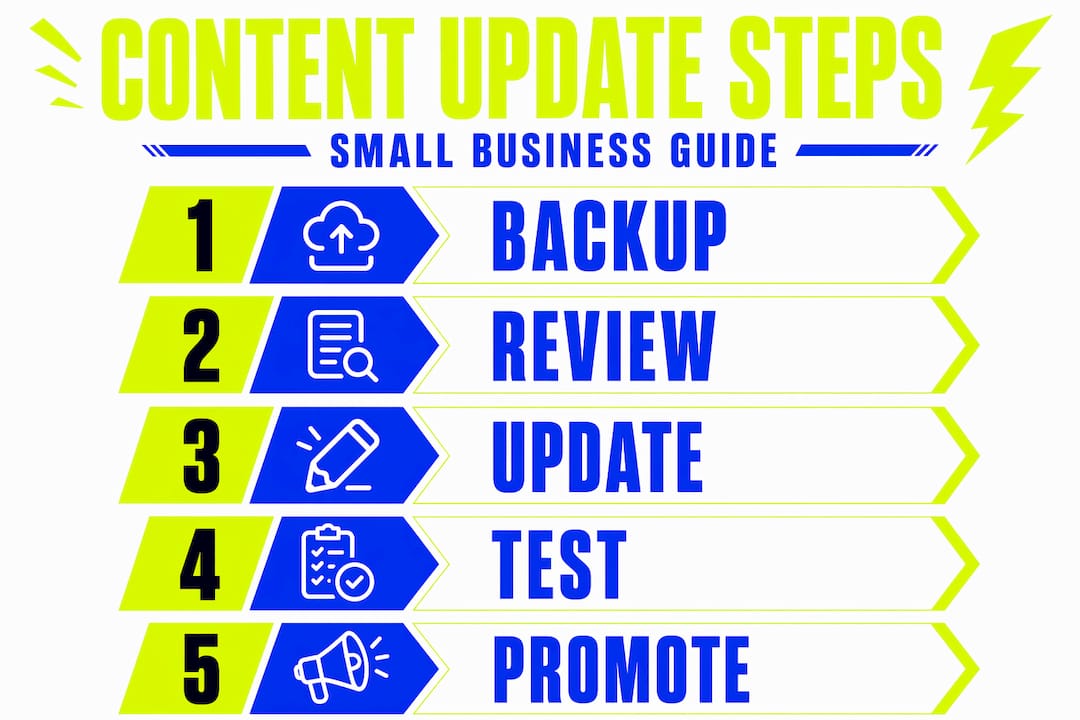
After executing updates carefully, it is time to validate your changes and make sure they deliver the desired impact.
Validating and promoting your updated website content
Publishing your updates is not the finish line. You need to confirm that search engines can actually see the changes, and then give your refreshed content the best possible chance of being discovered.
Steps to validate and promote updated content:
- Run a live test in Google Search Console. Open the URL Inspection tool, enter the updated page URL, and click “Test Live URL.” This confirms Googlebot can crawl and render your page correctly.
- Request indexing only after the live test passes. Once you are confident the page is rendering properly, click “Request Indexing” to prompt Google to recrawl it sooner.
- Monitor traffic and ranking changes over 30 and 60 days. Do not judge success in the first week. Search engines need time to reassess the page’s authority.
- Reshare updated content actively. Send it to your email list, post it on your social media channels, and share it in relevant online communities or local business groups.
- Track engagement signals like time on page, scroll depth, and click-through rates. These tell you whether the update is actually resonating with real visitors.
The URL Inspection tool in Google Search Console lets you run a live test and then explicitly request indexing after confirmed updates, making it one of the most practical tools available to small business owners managing their own sites.
Promotional tactics that actually move the needle:
- Email your existing subscribers with a “we have updated this” subject line. It performs better than you might expect.
- Share the page in relevant LinkedIn groups or Facebook communities for your industry.
- Update any older content that links to this page with fresh anchor text pointing to the updated version.
- Consider a small paid social boost if the page is commercially important and the update is significant.
The goal is not just better rankings. Refreshed content that reaches the right audience can boost brand engagement in ways that compound over time, turning casual visitors into returning customers and advocates.
With your updates verified and promoted, let us reflect on some common misconceptions around content refreshing.
Why the common wisdom about website content updates can mislead small businesses
Here is something most content guides will not tell you: not every update helps. In fact, certain well-intentioned changes can quietly damage the rankings you are trying to protect.
The most common mistake is treating content refreshes as cosmetic exercises. Changing a few words, updating the date in the title, and calling it done. Search engines are far more discerning than that. Avoid changing the “last modified” date for cosmetic edits, because doing so sends misleading freshness signals to search engines that can actually harm your position rather than improve it. Meaningful updates only.
Many small businesses also assume their website host’s automatic backup is sufficient. It often is not. Platform-level backups can be incomplete, delayed, or difficult to restore selectively. A genuine full backup, including both your database and all site files, is what gives you real protection.
The third pitfall is one that trips up even experienced site owners. Misusing Google Search Console’s “Request Indexing” prematurely wastes your precious recrawl quota and can actually delay the crawling of genuinely important updates. Request indexing only after you have verified the live URL is rendering correctly.
The uncomfortable truth is that one carefully planned, thoroughly executed update will outperform ten hasty tweaks every single time. Frequency without substance is noise. Substance without frequency is missed opportunity. The sweet spot is an annual update cycle anchored by meaningful changes, supported by proper preparation and verification.
Understanding these nuances is what separates small businesses that grow online from those that simply maintain a presence. It saves you time, protects your rankings, and gives your visitors a genuinely better experience each time they land on your pages.
How Kukoo Creative can help small UK businesses refresh websites with confidence
Knowing how to update website content is one thing. Having the confidence and expertise to do it well is another. If you are ready to make a real impact with your website refresh, we are here to help.

At Kukoo Creative, we have spent over a decade partnering with small business owners across the UK to build websites and brand identities that genuinely connect with the right audience. Our web design process is built around your goals, your brand, and the people you want to reach. From ensuring your updated site complies with the latest ICO guidance to crafting copy that converts, we handle the details so you can focus on running your business. Whether you need a full visual identity refresh or just want to understand what business branding could do for your growth, we would love to have that conversation with you.
Frequently asked questions
How often should I update my website content?
Treat 12 to 18 months as the default refresh trigger for most topics, though high-traffic pages or content in fast-changing industries may need attention more frequently.
Do I need to update privacy policies when changing website content?
Yes. In the UK, ICO guidance finalised in April 2026 requires you to update your cookie and privacy disclosures whenever you add or change tracking technologies such as cookies or pixels on your site.
What is the safest way to update a WordPress website?
Create full backups of both your database and site files, test all changes on a staging site before going live, then verify that all key features work correctly after the update.
How do I make sure Google recognises my updated content quickly?
Use Google Search Console’s URL Inspection tool to run a live test confirming the page renders correctly, then click “Request Indexing” to prompt a faster recrawl of your updated page.