
TL;DR:
- Effective information architecture organizes, labels, and connects digital content to improve user navigation and search engine understanding. It involves structuring hierarchy, navigation, taxonomy, and internal linking to create a coherent content blueprint. Good IA is crucial for enhancing usability, SEO, and long-term site scalability.
Information architecture is defined as the practice of organising, labelling, and connecting digital content so that users and systems can find, understand, and navigate it efficiently. It is the structural logic behind every website, app, and digital product you use. Good IA sits beneath the surface, shaping everything from your navigation menus to your URL structure, taxonomy, and internal linking. When it works well, users reach what they need without friction. When it fails, visitors leave, conversions drop, and search engines struggle to make sense of your content.
What is information architecture made of?
Information architecture includes hierarchy, navigation, internal linking, URL structure, taxonomy, breadcrumbs, and the relationships between core and supporting content. Each element plays a distinct role in making a site coherent and usable. Think of IA as the blueprint of a building. The rooms exist, but without a clear floor plan, nobody knows where to go.
The core components break down like this:
- Hierarchy and categorisation. Content is grouped into parent and child categories that reflect how users think about topics, not how your internal team organises files.
- Navigation design. This is the visible layer of IA. Menus, breadcrumbs, and sidebars are all expressions of the underlying structure.
- Labelling. Every page title, menu item, and category name must be clear and consistent. Good labelling reduces cognitive load and improves findability for users.
- URL structure. Clean, logical URLs signal content relationships to both users and search engines. A URL like
/services/web-design/communicates hierarchy instantly. - Taxonomy and internal linking. Taxonomy groups related content by shared attributes. Internal linking connects those groups so users and crawlers can move between them naturally.
Pro Tip: Map your content hierarchy on paper before touching any website platform. A simple tree diagram reveals gaps and overlaps that are invisible when you are working page by page.
The relationship between core content (your main service or product pages) and supporting content (blog posts, case studies, FAQs) is equally important. Supporting content should point back to core pages, reinforcing their authority and giving users a clear path to conversion.

Why does information architecture matter for UX and SEO?
Well-designed IA improves user navigation, supports intuitive interactions, and helps search engines extract meaning from your content. These three outcomes are deeply connected. A site that users can navigate confidently is also a site that search engines can crawl and index with confidence.
“Weak IA causes business friction long before visible website failures are apparent. A coherent website behaves as a connected body of knowledge rather than a collection of isolated pages.”
How Information Architecture Impacts SEO, AI Search, and Conversion
That insight captures something most site owners miss. You do not notice poor IA until users start bouncing, rankings slip, or your sales team reports that prospects cannot find the right information. By then, the damage is already done.
The importance of information architecture extends well beyond usability. Effective IA enhances machine interpretation as well as human navigation, allowing AI and search systems to understand content relationships explicitly. This matters enormously as AI-powered search tools become the primary way people discover information online. A site with clear taxonomy and logical hierarchy gives these systems the signals they need to surface your content accurately.
IA also supports what designers call “mental models.” A mental model is the expectation a user brings to a website based on past experience. If your navigation matches those expectations, users feel at home immediately. If it does not, they feel lost and leave. The NHS App design system, for example, organises content based on user tasks and mental models rather than internal data structures. That principle applies equally to a small business website as it does to a national health service.
Long-term, strong IA makes your site easier to scale. Adding new pages, sections, or product lines becomes straightforward when the underlying structure is clear. Without it, growth creates confusion, duplicate content, and navigation that collapses under its own weight.
How does IA relate to digital architecture and navigation?
Information architecture is one layer within the broader discipline of digital architecture. Digital architecture encompasses IA and technical governance, including reusable components, URL logic, and content models designed for long-term scalability. IA focuses on content organisation and user experience. Digital architecture connects that to engineering decisions, business strategy, and governance.
Navigation is IA’s most visible output. The menu a user sees is the surface expression of decisions made deep in the IA process. This distinction matters because many site owners try to fix a broken user experience by redesigning their navigation menu. That rarely works.
| Common mistake | What actually needs fixing |
|---|---|
| Redesigning the top navigation menu | Redefining content categories and hierarchy |
| Renaming menu labels | Auditing and consolidating overlapping content |
| Adding more menu items | Removing or merging pages that serve the same purpose |
| Changing visual layout | Restructuring URL logic and internal linking |
Fixing navigation menus often requires underlying restructuring of IA categories and hierarchies. A new coat of paint does not fix a broken floor plan.
Pro Tip: Before redesigning your navigation, run a card-sorting exercise with five to ten real users. Ask them to group your pages into categories that make sense to them. The results will almost always surprise you.
Technical governance is the part of digital architecture that most IA discussions ignore. URL logic, reusable page templates, and content models all determine how well your IA holds up as your site grows. If your URL structure is inconsistent or your templates do not enforce labelling standards, even a well-planned IA will degrade over time. You can read more about structuring website navigation for practical guidance on applying these principles to real sites.
How to create effective information architecture
Creating effective IA starts with research, not design. You need to understand how your users think before you decide how to organise your content.
Step 1: Research user mental models and tasks
Designers often create navigation based on internal systems rather than how users think. This is the single most common IA mistake. User interviews, task analysis, and card-sorting sessions reveal the categories and labels that feel natural to your audience. Start there.
Step 2: Audit your existing content
List every page on your site. Group pages by topic. Identify duplicates, orphaned pages (pages with no internal links pointing to them), and gaps where users need information that does not exist yet. A content audit is unglamorous work, but it is the foundation of every good IA project. Pairing this with a solid content strategy platform helps you plan data-driven decisions rather than guessing.
Step 3: Build your hierarchy
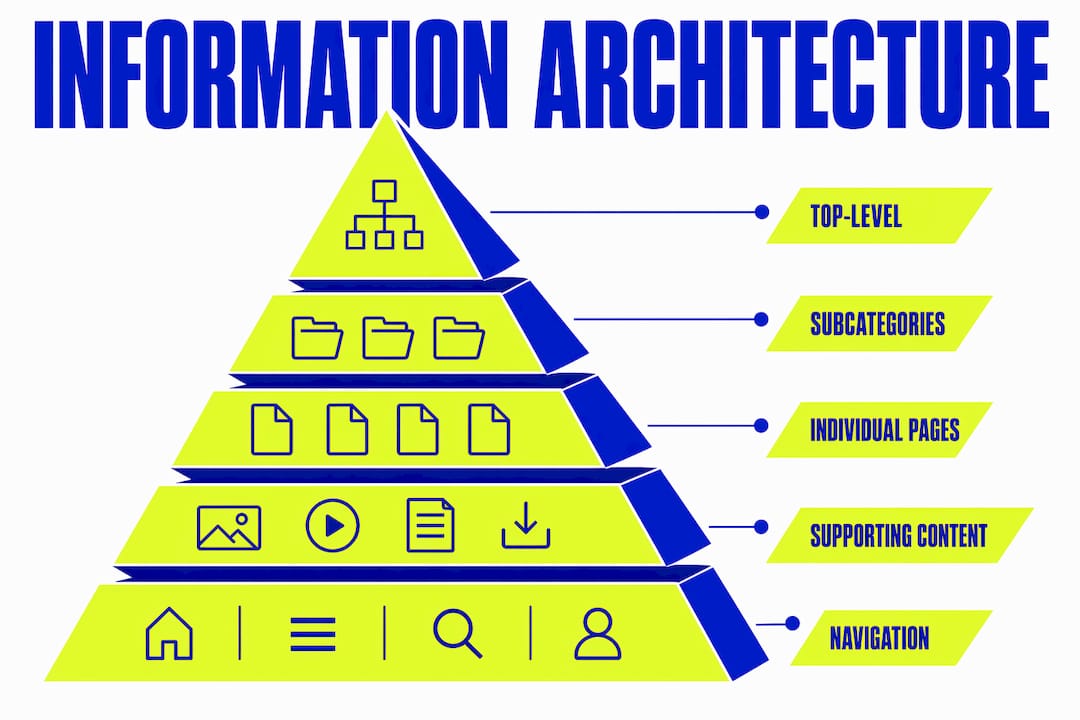
Organise content into a clear parent-child structure. Most sites work well with three levels: top-level categories, subcategories, and individual pages. Avoid going deeper than four levels. Users rarely navigate beyond that, and search engines assign less authority to deeply buried pages.
Step 4: Define your labelling system
Choose clear, consistent names for every category, page, and navigation item. Test labels with real users before committing. A label that seems obvious to your team may mean nothing to your audience.
Step 5: Map your internal linking
Every core page should receive links from multiple supporting pages. Every supporting page should link back to at least one core page. This creates the “connected body of knowledge” that both users and search engines reward. Learning how to plan website content for organic traffic gives you a framework for aligning this linking strategy with your SEO goals.
Step 6: Test and refine
IA is never finished. Run usability tests after launch. Track where users drop off. Use that data to refine your hierarchy, labels, and linking. Iteration is not a sign of failure. It is how good IA gets built.
The practical reality is that IA design balances user needs with business objectives. Your users want to find information quickly. Your business wants users to reach specific pages and take specific actions. Good IA satisfies both. Understanding web usability principles helps you keep both goals in view throughout the process.
Key takeaways
Information architecture is the structural logic that organises, labels, and connects digital content to serve both users and search engines effectively.
| Point | Details |
|---|---|
| IA is structural, not visual | Hierarchy, taxonomy, and labelling decisions shape every user interaction before design begins. |
| Navigation reflects IA | Redesigning menus without fixing underlying IA structure rarely improves user experience. |
| Mental models drive good IA | Organise content around how users think, not how your internal team categorises information. |
| IA affects SEO and AI search | Clear content relationships help search engines and AI systems surface your pages accurately. |
| IA requires ongoing iteration | Test, measure, and refine your structure after launch to maintain usability as your site grows. |
Why I think most businesses get IA backwards
After years of working on digital design projects, the pattern I see most often is this: businesses invest heavily in visual design and almost nothing in structure. They commission a beautiful website, launch it, and then wonder why users cannot find the services page or why their blog posts never rank.
The uncomfortable truth is that visual design without IA is decoration. It looks good but does not work. The sites that consistently perform well are the ones where someone spent real time mapping content, defining categories, and testing labels with actual users before a single pixel was placed.
AI-powered search is making this more urgent, not less. As tools like Perplexity and AI Overviews in Google become the first point of contact for many searches, the sites that get cited are the ones with clear, connected content structures. Machines need explicit relationships. They cannot infer meaning from a beautiful layout.
My advice for anyone starting with IA: resist the urge to jump to tools and templates. Spend a day talking to your users first. The structure will follow from what you learn.
— Kukoo
Good design starts with good structure
At Kukoocreative, we have spent over a decade helping business owners build websites that do more than look credible. They work. That means thinking about structure, content relationships, and user journeys before we ever open a design file.
If you are building or redesigning a website, our web design process puts IA thinking at the centre of every project. We also help businesses build the brand foundations that make every digital touchpoint feel consistent and confident. Take a look at how logo design shapes brand perception and see how structure and identity work together. Get in touch and let’s build something that genuinely works for your audience.
FAQ
What is the information architecture definition?
Information architecture is the practice of organising, labelling, and structuring digital content so users and systems can find and navigate it efficiently. It includes hierarchy, taxonomy, navigation, URL structure, and internal linking.
What are the main elements of information architecture?
The core elements are hierarchy, navigation, labelling, taxonomy, URL structure, breadcrumbs, and internal linking. Together, they define how content is organised and connected across a digital product.
How does information architecture differ from user experience?
Information architecture is one component of user experience design. IA defines the structure and organisation of content, while UX covers the full range of interactions a user has with a product, including visual design, accessibility, and performance.
Why does information architecture matter for SEO?
Clear IA helps search engines understand content relationships and hierarchy. Well-structured sites with logical taxonomy and internal linking are easier to crawl, index, and rank accurately.
How do I start creating information architecture?
Start by researching how your users think and what tasks they need to complete. Then audit your existing content, build a clear hierarchy, define consistent labels, and map your internal linking before moving to visual design.