
TL;DR:
- Website optimization involves improving server response, assets, and scripts to enhance user experience and conversions. Focusing on Core Web Vitals, especially LCP, INP, and CLS, is essential for search ranking and site performance. Continuous monitoring with real user data helps maintain speed and prevents regressions over time.
Website optimisation steps are the practical actions business owners and marketers take to improve site performance, user engagement, and conversion rates. A site that loads slowly, responds poorly on mobile, or fails Google’s Core Web Vitals benchmarks will lose visitors before they ever see your offer. Reducing load time by just one second corresponds to a 3% increase in mobile conversions. That single figure shows why performance is not a technical luxury. It is a direct revenue lever. Tools like Google Search Console, Lighthouse, and Chrome UX Report give you the data to act with confidence.
Which performance metrics should you prioritise first?
The recognised industry framework for measuring website performance is Google’s Core Web Vitals. These three metrics define the quality of a user’s experience on your site, and they directly influence your search rankings.
The three metrics and their 2026 passing thresholds are:
- LCP (Largest Contentful Paint): measures how quickly the main content loads. Pass threshold: under 2.5 seconds.
- INP (Interaction to Next Paint): measures how fast your site responds to every click, tap, or keystroke throughout the session. Pass threshold: under 200ms.
- CLS (Cumulative Layout Shift): measures visual stability. Pass threshold: below 0.1.
Only 48% of mobile origins currently pass all three metrics at the 75th percentile. That means more than half of all mobile websites are failing the standard Google uses to assess user experience. The individual pass rates tell a more nuanced story: LCP passes on 62% of origins, INP on 77%, and CLS on 81%. LCP is the hardest metric to crack, and it is usually the first place to focus your effort.
Before you touch any frontend code, check your TTFB (Time to First Byte). Frontend optimisations are ineffective when TTFB is high because server response speed sets the ceiling for everything else. A TTFB under 200ms is the target. Anything above 800ms signals a server problem that no amount of image compression will fix.
Pro Tip: Use Google Search Console’s Core Web Vitals report alongside PageSpeed Insights to see both field data (real users) and lab data (simulated). The two together give you a complete picture.
How do you speed up website loading performance?
Speed optimisation follows a clear order: server first, then assets, then rendering. Skipping ahead wastes effort.
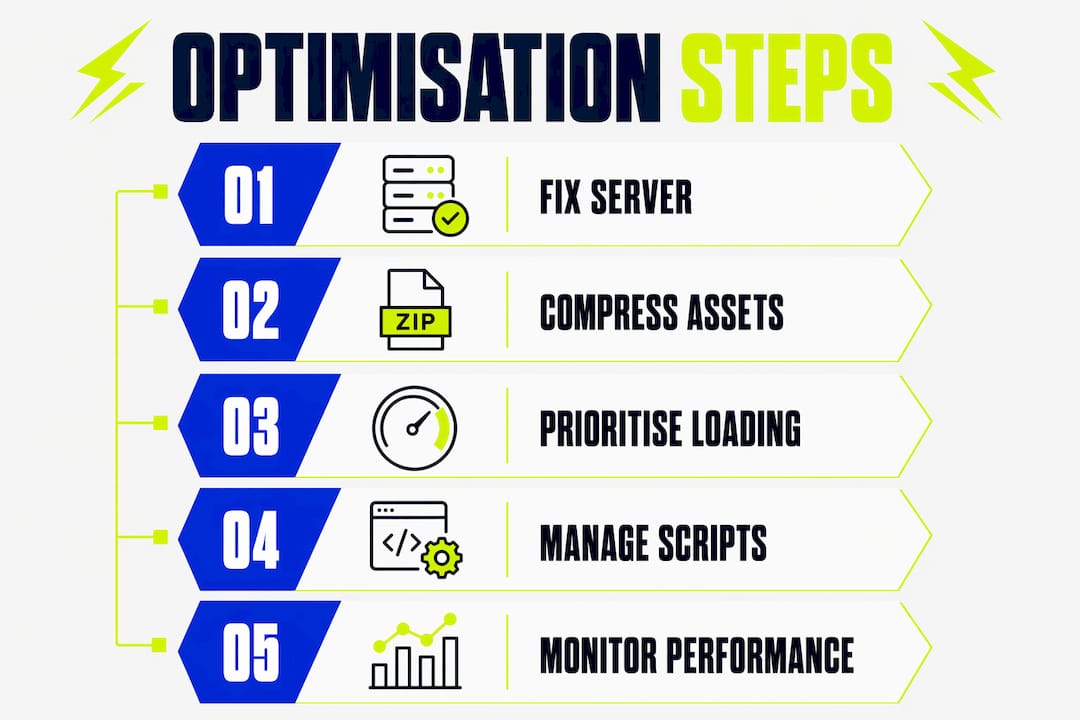
Start with your server and hosting
Your hosting environment is the foundation. Shared hosting plans frequently produce TTFB values above 800ms. Upgrading to a VPS or managed hosting provider, implementing server-side caching with tools like Redis or Varnish, and deploying a CDN (Content Delivery Network) such as Cloudflare or Fastly will cut TTFB dramatically. A CDN serves your content from nodes closest to each visitor, reducing latency for users in Manchester, Edinburgh, and beyond.
Compress and convert your assets
Brotli compression reduces text resource sizes by 60–80%, outperforming the older Gzip standard. Most modern servers and CDNs support Brotli. Enable it at the server level and you will see immediate reductions in HTML, CSS, and JavaScript transfer sizes.

For images, the gains are equally significant. Modern formats like WebP and AVIF cut file sizes by 25–50% compared to JPEG and PNG. The table below summarises the key asset optimisation options:
| Asset Type | Legacy Approach | Modern Approach | Typical Saving |
|---|---|---|---|
| Text resources | Gzip compression | Brotli compression | 60–80% |
| Images | JPEG / PNG | WebP / AVIF | 25–50% |
| CSS delivery | Full stylesheet load | Critical CSS inlined | Faster LCP |
| JavaScript | Synchronous loading | Async / deferred | Faster INP |
Understanding why you should optimise images goes beyond file size. Correctly sized images prevent layout shifts that damage your CLS score.
Prioritise what loads first
Lazy loading defers off-screen images and videos until the user scrolls toward them. This reduces initial page weight and speeds up LCP. For above-the-fold content, do the opposite: preload critical resources using <link rel="preload"> tags so the browser fetches them immediately. Inlining critical CSS directly into the <head> removes a render-blocking request and improves LCP further.
Pro Tip: Run your site through Google’s PageSpeed Insights and look at the “Opportunities” section. It ranks improvements by estimated time saving, so you can tackle the highest-impact fixes first.
How should you handle JavaScript and third-party scripts?
JavaScript management is where many business websites quietly fall apart. A page can look fast on initial load but feel sluggish to use. That is an INP problem, and it is almost always caused by poorly managed scripts.
INP replaced FID as a Core Web Vital because it measures responsiveness across the entire user session, not just the first interaction. This shift matters. You can no longer optimise for a single click and call it done. Every button press, form field, and menu interaction is now measured.
The three script loading strategies work as follows:
- Synchronous loading: the browser stops parsing HTML until the script downloads and runs. Use this only for scripts that are genuinely critical to rendering.
- Async loading: the script downloads in parallel with HTML parsing and runs as soon as it is ready. Good for analytics tools like Google Analytics 4.
- Defer loading: the script downloads in parallel but runs only after HTML parsing completes. The right choice for most non-critical scripts.
An advanced approach called application sequencing takes this further. Critical scripts load synchronously. Revenue-adjacent scripts (such as payment widgets) load asynchronously. Enhancement scripts (chat widgets, social embeds) are deferred to idle time using requestIdleCallback. This structure keeps your main thread free for user interactions.
Third-party scripts cause dramatic performance regressions when loaded without care. A single marketing tag loaded synchronously can add hundreds of milliseconds to your TTFB and block rendering entirely. Audit your third-party scripts quarterly using Chrome DevTools or WebPageTest. Remove any script that cannot justify its performance cost.
Pro Tip: Use a tag management system like Google Tag Manager to control when third-party scripts fire. Set triggers so non-critical tags load only after the page becomes interactive.
Which tools help you monitor and sustain improvements?
Optimisation is not a one-time task. Sites regress. New features add weight. Traffic patterns shift. A monitoring system catches problems before they affect your rankings or conversions.
Here is a practical four-step monitoring cycle:
- Implement Real User Monitoring (RUM). Tools like SpeedCurve, Datadog, or the Chrome UX Report collect performance data from actual visitors. RUM provides more relevant insights than lab tests because it reflects real devices, real networks, and real behaviour.
- Segment your data. Segmenting by device, geography, and user journey reveals problems that averages hide. A page might perform well on desktop in London but fail on mobile in rural areas with slower connections.
- Deploy changes with feature flags. Tools like LaunchDarkly or Unleash let you roll out changes to a subset of users first. If a change causes a regression, you can roll it back without a full deployment.
- Document every change. Keep a performance changelog that records what was changed, when, and what effect it had. This prevents teams from undoing previous gains and builds institutional knowledge over time.
Prioritising work using an Impact × Effort × Risk matrix prevents wasted effort. Structural improvements like template refactors and server-side caching score high on impact and low on risk. Minor tweaks like button colour changes score low on both. Always address structural issues first.
A useful resource for keeping your site in good shape is this website review workflow guide, which covers how to build a regular auditing habit into your process.
Key takeaways
Effective website optimisation requires fixing server performance first, then assets, then scripts, with continuous monitoring to prevent regressions.
| Point | Details |
|---|---|
| Fix TTFB before anything else | Server response under 200ms sets the ceiling for all other speed gains. |
| Target all three Core Web Vitals | LCP, INP, and CLS must all pass at the 75th percentile for full compliance. |
| Use modern compression and formats | Brotli and WebP or AVIF deliver the largest asset size reductions available. |
| Manage scripts by priority tier | Defer non-critical scripts to idle time to protect INP throughout the session. |
| Monitor with real user data | Segment RUM data by device and geography to find problems that averages miss. |
What i have learnt from years of website optimisation work
Most business owners come to us having already spent time on cosmetic fixes: new fonts, fresh colours, a redesigned hero section. The site still converts poorly. The reason is almost always structural. A slow server, uncompressed images, and synchronous third-party scripts are doing the real damage, and no visual refresh will fix them.
The metric that catches people off guard most often is INP. Staying competitive in 2026 requires optimising responsiveness throughout the entire visit, not just at the point of first load. A site can score well on LCP and still feel unresponsive because every click takes 400ms to register. Visitors notice that. They leave.
There is also a common misconception that passing Core Web Vitals is the finish line. Sites at the 75th percentile speed outperform median sites by only 1–2% in conversion rate. The real gains come from pushing into the top percentiles. Passing is the floor, not the ceiling.
My honest advice: document every change you make. Not for compliance. For your own sanity six months later when a new plugin has quietly added 300ms to your TTFB and nobody can remember what changed. A simple changelog in Notion or a shared Google Sheet is enough. It is the habit that separates sites that stay fast from sites that drift back to where they started.
— Kukoo
How Kukoocreative helps you build a faster, stronger website
Speed and structure matter. So does the impression your site makes the moment it loads.

At Kukoocreative, we have spent over a decade helping business owners build websites that perform well and look credible from the first click. A fast site built on a weak visual identity still struggles to convert. Our web design process integrates performance thinking with strong brand design from the very start, so you are not retrofitting speed onto a site that was never built for it. If you want a website that works as hard as you do, take a look at our portfolio and see what we have built for businesses like yours.
FAQ
What are the most important website optimisation steps to start with?
Fix your server response time (TTFB) first, then address image compression, script loading, and Core Web Vitals. Structural improvements deliver the highest returns before any frontend tweaks.
What is a good TTFB target for website performance?
A TTFB under 200ms is considered excellent. Anything above 800ms indicates a server-side problem that will limit all other optimisation efforts.
How do core web vitals affect my search rankings?
Google uses Core Web Vitals as a ranking signal. Passing all three metrics at the 75th percentile (LCP under 2.5s, INP under 200ms, CLS below 0.1) is the minimum standard for competitive search visibility.
What is the difference between RUM and lab testing?
Real User Monitoring (RUM) captures performance data from actual visitors on real devices and networks. Lab tests simulate conditions in a controlled environment. RUM is more reliable for identifying real-world problems.
How often should i audit my website’s performance?
Run a full performance audit at least quarterly, and monitor Core Web Vitals continuously via Google Search Console. Deploy any significant site changes with a rollback plan in place.