
TL;DR:
- Effective website navigation simplifies choices by limiting top-level items to five or seven, reducing visitor frustration. Testing labels and structures with real users ensures visitors can find content quickly, especially on mobile devices. Well-designed navigation boosts conversions and SEO by making pages easier to discover and reducing bounce rates.
Website navigation structure is the organised hierarchy of links and menus that guides visitors to the content they need. 94% of users name easy navigation as the most useful feature of a website, and 88% say they will not return after a poor experience. Those numbers make navigation one of the highest-impact decisions you will make for any site. Knowing how to structure website navigation well means applying cognitive science, accessibility standards, and real user research together. This guide covers every layer of that process, from core principles to common mistakes, so you can build menus that serve your visitors and your business goals.
What are the core principles of effective website navigation structure?
The single most important principle is limiting choice. Miller’s Law tells us that working memory holds roughly 5–7 items at once. Apply that directly to your top-level menu. More than seven items forces visitors to scan harder, slow down, and sometimes give up entirely.
Beyond item count, the principles that drive good navigation are:
- Limit top-level items to 5–7. Every item beyond seven adds cognitive load without adding clarity.
- Use predictable labels. Standard terminology outperforms creative naming every time. “Services,” “About,” and “Contact” work because visitors already know what to expect.
- Organise by user task, not company structure. Your internal departments are invisible to visitors. Group pages around what users want to do, not how your business is organised.
- Keep depth shallow. 75% of e-commerce sites over-categorise their content. Every page should be reachable within three clicks.
- Signal submenus clearly. W3C WAI guidelines require visible indicators such as “+” icons or chevrons for expandable items. Hover-only menus exclude keyboard and touch users entirely.
- Stay consistent across devices. A menu that works on desktop must translate to mobile without losing structure or clarity.
The real role of navigation menus is not decoration. It is a functional tool that either removes friction or creates it.
Pro Tip: Test your navigation labels with five people who have never seen your site. If they cannot predict what sits behind a label, rename it before you build.
Which navigation types suit different website needs?
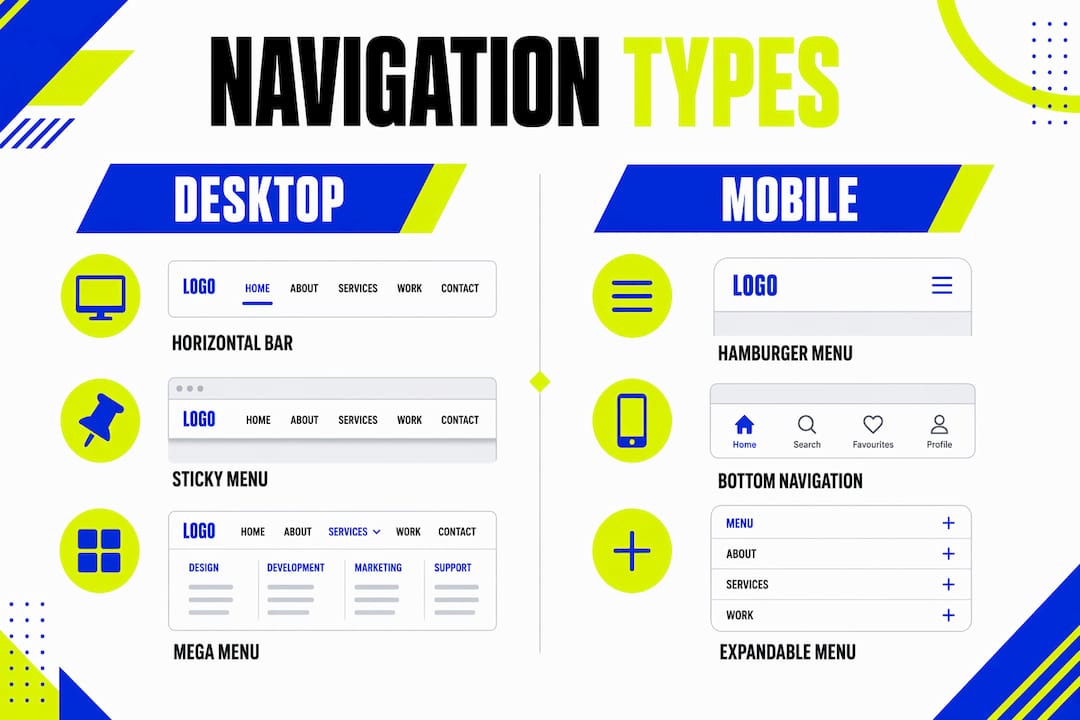
Choosing the right navigation layout depends on your content volume, your audience, and the devices they use. Each format solves a different problem.

| Navigation type | Best use case | Key consideration |
|---|---|---|
| Horizontal top bar | Most business and portfolio sites | Keep to 5–7 items; standard and familiar |
| Dropdown menu | Sites with clear category hierarchy | Limit to two levels; avoid hover-only triggers |
| Mega menu | Large retail or content-heavy sites | Use two levels maximum; group visually |
| Sidebar navigation | Documentation or dashboard interfaces | Works well for deep content trees |
| Breadcrumbs | Multi-level sites and e-commerce | Always show current location in hierarchy |
| Footer navigation | Secondary links and legal pages | Supplements, never replaces, primary nav |
| Sticky menu | Long-scroll pages and mobile | Keeps navigation accessible without scrolling |
Sticky menus improve usability significantly on long pages and mobile devices because visitors never lose their way back to the main menu. That small detail reduces frustration on content-heavy pages.
Mobile deserves its own attention. 67% of mobile sites perform poorly in navigation UX, often because designers hide too much behind a single hamburger icon. 33% of mobile sites bury key product categories under a generic “Menu” or “Shop” link, which kills engagement before it starts. Surface your most important categories directly on mobile rather than nesting them two levels deep.
Mega menus work well for large catalogues, but only when implemented accessibly. Limit them to two levels, use bold headings and icons to help visitors scan, and always support keyboard navigation. A mega menu that cannot be used without a mouse fails a significant portion of your audience.
For guidance on making these choices work across screen sizes, the benefits of responsive design for business websites covers the technical side in detail.
How to plan a user-centred navigation structure step by step
Planning navigation before you build it saves hours of rework. Follow these steps in order.
-
Run a card sorting exercise. Give participants index cards labelled with your page names and ask them to group the cards naturally. Card sorting with as few as 5–10 users reveals how real people group your content, and those groupings often differ sharply from your internal assumptions.
-
Identify your priority pages. List the pages that drive your business goals, such as a contact form, a product page, or a booking link. These must appear at the top level or be reachable in one click from it.
-
Build a sitemap. Map every page into a logical hierarchy before you touch a design tool. A sitemap makes shallow depth achievable because you can see where nesting is unnecessary.
-
Draft your top-level labels. Write candidate labels, then test them against the card sort results. Replace any label that participants did not use themselves.
-
Prototype with real constraints. Build a clickable prototype with your five to seven top-level items and test it across desktop, tablet, and mobile. Watch where users hesitate or click the wrong item.
-
Run an accessibility audit. Check that all menus are keyboard-navigable, that focus states are visible, and that screen readers announce submenu states correctly.
| Planning stage | Output | Common mistake to avoid |
|---|---|---|
| Card sorting | User-defined content groups | Skipping this and using internal taxonomy |
| Priority mapping | Shortlist of top-level items | Including every page at the top level |
| Sitemap | Full page hierarchy | Creating more than three levels of depth |
| Label drafting | Tested, plain-language labels | Using creative or branded terminology |
| Prototype testing | Validated navigation structure | Testing only on desktop |
| Accessibility audit | WCAG-compliant menu behaviour | Relying on hover-only interactions |
Pro Tip: Run tree testing after your prototype stage. Ask participants to find a specific page using only the navigation labels, with no visual design present. The results show exactly where your structure breaks down.
For a fuller picture of how this fits into the wider build, the web design process guide for Leeds business owners walks through each stage from brief to launch.
What are the most common navigation mistakes?
Most navigation problems come from the same handful of errors. Recognising them early saves you from building something that needs a complete rebuild six months later.
- Overloading the top-level menu. Adding every page to the main nav feels thorough but creates paralysis. Visitors scan, not read, so a long menu is a menu that gets ignored.
- Using creative labels. Names like “Our World” or “The Hub” sound distinctive but cause user frustration and navigation failure. Visitors cannot predict what sits behind an unfamiliar label, so they leave.
- Building excessive depth. Three levels of nesting is the practical maximum. Beyond that, visitors lose their sense of where they are and how to get back.
- Ignoring mobile usability. Designing navigation on a desktop and assuming it will work on mobile is the most common mistake in small business web projects. 50% of users already fail to predict where content lives on standard desktop sites. That failure rate rises sharply on mobile when menus are poorly adapted.
- Hiding the current location. Visitors need to know where they are at all times. Active states, breadcrumbs, and highlighted menu items are not optional extras. They are orientation tools.
- Skipping user testing. Assumptions about content grouping are almost always wrong. User mental models differ from internal organisational structures more often than not. Testing with real people is the only reliable way to validate your structure.
A quick check: if your navigation was designed by someone who already knows the site inside out, it probably needs testing with someone who does not.
How does navigation structure affect conversions and SEO?
Navigation quality has a direct, measurable effect on business results. Improving site navigation has been shown to increase conversion rates by 18.5%. That figure represents real revenue, not a theoretical improvement.
“Navigation is not a design feature. It is the primary mechanism by which visitors decide whether your site is worth their time. A confused visitor does not ask for help. They leave.”
Clear navigation also affects how search engines index your site. Crawlers follow links to discover pages. A shallow, well-labelled structure means every page gets found and indexed efficiently. Deep or inconsistent navigation buries pages that should be ranking. Internal linking through navigation also distributes authority across your site, which supports organic visibility.
Reduced bounce rates follow naturally from good navigation. When visitors find what they need quickly, they stay longer and engage more. That behaviour signals quality to search engines, which reinforces rankings over time. The importance of website navigation for small and medium businesses is particularly high because those sites typically have fewer inbound links and rely more heavily on on-site experience to retain visitors.
Post-launch, treat navigation as a living system. Review analytics quarterly to identify pages with high exit rates or low traffic. Both signals point to navigation gaps. Adjust labels, restructure categories, and retest when the data suggests a problem.
For professional website design and development that builds navigation around UX and conversion goals from the start, working with specialists who apply these principles by default saves significant time and cost.
Key takeaways
Well-structured website navigation reduces cognitive load, improves accessibility, and directly increases conversions by making every page reachable within three clicks.
| Point | Details |
|---|---|
| Limit top-level items | Keep main navigation to 5–7 items to match working memory capacity. |
| Use predictable labels | Standard terminology outperforms creative naming for clarity and user confidence. |
| Plan with card sorting | Test user groupings before building to avoid assumptions about content structure. |
| Prioritise mobile usability | Surface key categories directly on mobile rather than hiding them under generic links. |
| Measure and refine | Review analytics quarterly and retest navigation after any structural changes. |
What I have learned from years of navigation projects
The gap between what business owners want from navigation and what their visitors actually need is wider than most people expect. Owners want to showcase everything. Visitors want to find one thing quickly and leave satisfied.
The most common mistake I see is treating navigation as a site map. Every page gets listed, every department gets a slot, and the result is a menu that tells you everything about the company and nothing about what you should do next. That approach bottlenecks growth because visitors cannot find the pages that convert.
Iterative testing changes everything. Even a single round of tree testing with five participants will surface problems that weeks of internal review missed. Small teams with limited budgets can run card sorting exercises using free tools and a handful of willing participants. The investment is small. The improvement is not.
The shift to mobile-first design has also changed what good navigation looks like. A menu that works beautifully on a 27-inch monitor may be completely unusable on a phone. Designing for the smallest screen first and scaling up produces better results than the reverse. Accessibility is the same story. Building it in from the start costs far less than retrofitting it later.
Navigation is not finished at launch. The sites that perform best treat it as an ongoing conversation with their visitors, adjusting based on real behaviour rather than internal preference.
— Kukoo
How Kukoocreative can help you build navigation that works
Getting navigation right from the start saves you from costly redesigns later. At Kukoocreative, we have spent over a decade helping business owners create websites that connect with the right people and drive real results.

We apply UX research, accessibility standards, and conversion-focused thinking to every navigation structure we build. Whether you are starting from scratch or reworking an existing site, we align your menu structure with your business goals and your visitors’ expectations. Explore our web design portfolio to see how we have helped businesses build credible, high-performing websites. Ready to make your site work harder? Visit our web design process guide to see exactly how we work.
FAQ
How many items should a website navigation menu have?
Keep top-level navigation to 5–7 items. This aligns with Miller’s Law on working memory capacity and reduces decision fatigue for visitors.
What is the three-click rule in website navigation?
The three-click rule states that every page on a site should be reachable within three clicks from the homepage. Shallow navigation depth reduces frustration and improves both user experience and search engine crawlability.
Why do creative navigation labels cause problems?
Creative or branded labels force visitors to guess what sits behind them. Standard terms like “Services,” “About,” and “Contact” are predictable, which means visitors find content faster and leave less often.
How does mobile navigation differ from desktop navigation?
Mobile navigation must surface key categories directly rather than hiding them under generic links. One-third of mobile sites bury important pages under a single “Menu” link, which reduces engagement significantly.
Does navigation structure affect SEO?
Yes. Search engine crawlers follow navigation links to discover and index pages. A shallow, well-labelled structure improves crawlability, distributes link authority across the site, and supports organic rankings.