
TL;DR:
- Typography is the art of arranging type to enhance readability and visual appeal, serving as the foundation of effective communication. Key elements include typeface, size, spacing, alignment, and color, each influencing how content is perceived and understood. Its evolution from Gutenberg’s movable type to digital and web standards reflects a continuous effort to make text clear, accessible, and aligned with brand identity.
Typography is defined as the art and technique of arranging type to make written content legible, readable, and visually appealing. It covers every decision you make about text: which typeface you choose, how large it appears, how much space sits between lines, and how the whole composition holds together on a page or screen. Typography is not decoration. It is the backbone of visual communication, and understanding it changes how you see every piece of design around you.
What is typography and why does it matter?
Typography is the practice of selecting and arranging type to communicate a message with clarity and intention. The Cambridge Dictionary identifies size, spacing, alignment, typeface, and colour as the five components most critical to typographic success. Each one shapes how a reader experiences your content before they consciously register a single word.
Think about the last time a website felt difficult to read. Chances are the typography was the culprit. Text that is too small, lines packed too tightly together, or a typeface that clashes with the content’s tone all create friction. The importance of typography lies in its functional goal: communication clarity comes before visual styling, always.
Typography also shapes perception. A serif typeface like Georgia signals tradition and authority. A geometric sans-serif like Futura communicates modernity and precision. These associations are not accidental. They are the result of centuries of letterform development that designers draw on every time they open a project file.
What are the essential elements of typography design?
Every typographic decision connects back to a small set of core elements. Understanding each one gives you a reliable framework for making confident choices.
Typeface and font are the starting point. A typeface is the overall design of a set of characters. A font is a specific variation within that typeface, such as bold or italic. Designers typically work with four broad categories:
- Serif typefaces (Times New Roman, Georgia): traditional, authoritative, well-suited to long-form reading
- Sans-serif typefaces (Helvetica, Arial): clean, modern, highly legible on screens
- Script typefaces (Pacifico, Lobster): expressive and personal, best used sparingly
- Display typefaces (Impact, Bebas Neue): high-impact at large sizes, unsuitable for body text
Size determines hierarchy and emphasis. Body text typically sits between 16px and 18px for web, while headings scale upward in deliberate increments to signal importance.
Line height (also called leading) controls the vertical space between lines of text. Tight leading creates a dense, pressured feel. Generous leading opens the text up and makes it breathe.

Letter spacing (tracking) and word spacing affect how text flows across a line. Adjusting these subtly can transform a cramped paragraph into something genuinely pleasant to read.
Alignment organises text relative to a margin or container. Left-aligned text is the most legible for Western readers. Centred text works for short headings but becomes difficult to follow in longer passages.
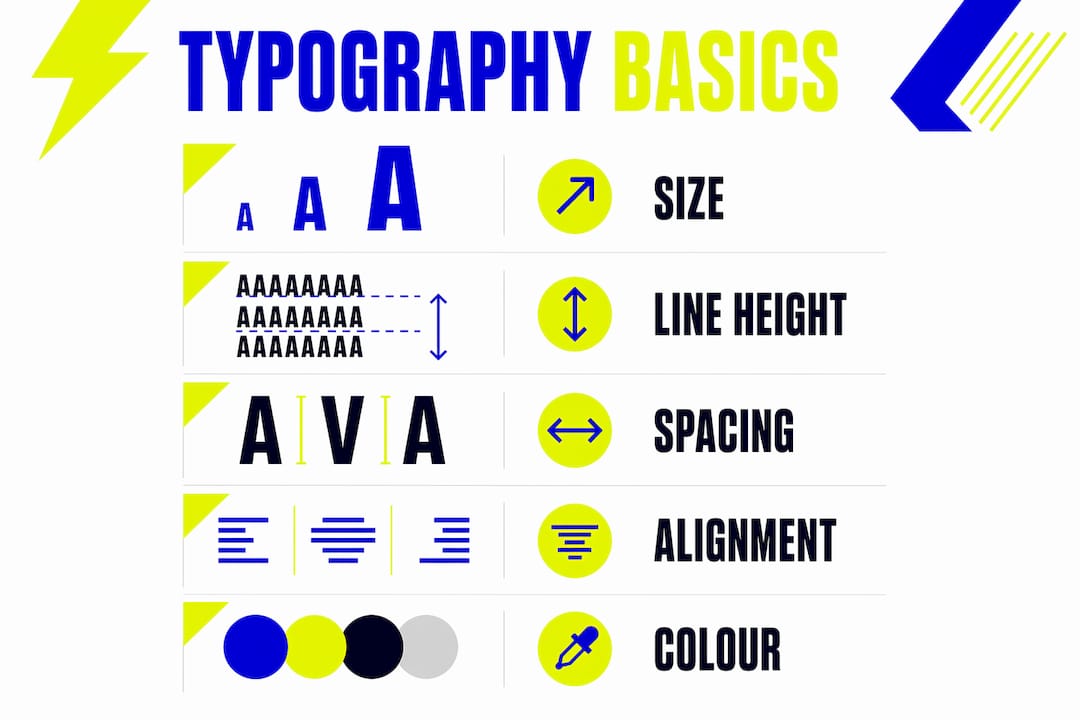
Colour affects both readability and tone. High contrast between text and background is non-negotiable for accessibility. Colour also carries emotional weight: dark navy text on cream paper feels very different from white text on a vivid orange background.
Pro Tip: Inconsistent spacing and alignment are the most common beginner mistakes in typography. Before choosing a new typeface, audit your current spacing. Fixing those two elements alone will improve your design more than any font swap.
| Typeface style | Best used for | Tone it conveys |
|---|---|---|
| Serif | Long-form body text, print | Traditional, trustworthy |
| Sans-serif | Web interfaces, UI, headings | Modern, clean, approachable |
| Script | Logos, invitations, accents | Personal, creative, expressive |
| Display | Headlines, posters, banners | Bold, dramatic, attention-grabbing |
How has typography evolved from Gutenberg to the digital age?
Typography has a history that stretches back thousands of years, but its modern form begins with a single invention. Gutenberg’s movable type, developed around 1440, standardised letterforms into organised, reusable blocks for the first time. Before that, scribes produced every manuscript by hand, meaning no two copies of a text looked identical.
The printing press transformed typography from a craft into a system. Printers developed consistent proportions for letters, established conventions for spacing, and created the first type families. Many of the typefaces we use today, including Garamond and Caslon, trace their origins directly to this era.
The industrial revolution brought mechanised typesetting, and with it, an explosion of display typefaces designed to compete for attention on posters and advertisements. This period introduced the bold, condensed letterforms that still appear in headlines today.
Digital typography arrived with the personal computer in the 1980s. Adobe’s PostScript language and the development of TrueType fonts by Apple and Microsoft gave designers precise control over letterforms on screen and in print. The web then introduced new constraints: fonts had to render clearly at small sizes, across different operating systems, and on screens with varying resolutions.
Today, variable fonts allow a single font file to contain an entire range of weights and widths, giving designers flexibility without the performance cost of loading multiple files. The history of typography is, at its core, a history of solving the same problem across changing technologies: how do you make text clear, beautiful, and purposeful?
Why does accessibility matter in typography?
Accessible typography is not optional. It is the difference between content that works for everyone and content that excludes a significant portion of your audience.
The WCAG 2.1 Success Criterion 1.4.12 sets minimum spacing thresholds that typography must meet to be considered accessible:
- Line height must be at least 1.5 times the font size
- Paragraph spacing must be at least 2 times the font size
- Letter spacing must be at least 0.12 times the font size
- Word spacing must be at least 0.16 times the font size
These numbers exist because users with dyslexia, low vision, or cognitive differences often adjust text spacing in their browsers or assistive technologies. If your typography breaks when spacing is adjusted, your design fails the people who need it most.
Designers who use relative sizing units such as em and rem in web typography allow text to scale correctly with a user’s system settings. A font size set in pixels ignores the user’s preferences entirely. A font size set in rem respects them.
Colour contrast is equally critical. The WCAG standard requires a contrast ratio of at least 4.5:1 for normal text and 3:1 for large text. Tools like the WebAIM Contrast Checker let you verify this in seconds.
Pro Tip: Test your typography on a mobile device with the system font size increased to its maximum setting. If your layout breaks or text overlaps, your spacing units need revisiting before launch.
How does typography shape user experience and brand identity?
Typography is one of the most direct ways to guide a reader’s attention. Typographic hierarchy is a systematic set of rules for size, weight, and spacing that helps users scan and comprehend content consistently. Without it, every text element competes for attention equally, and the reader has no clear path through the page.
A well-built hierarchy typically works across three levels:
- Primary level (H1 headings): the largest, heaviest text on the page, used once per section to signal the main topic
- Secondary level (H2 and H3 headings): mid-weight text that organises content into scannable chunks
- Body level: the smallest, lightest text, optimised for sustained reading comfort
In branding, typography influences perception in ways that go far beyond aesthetics. The typeface a brand chooses becomes part of its visual identity, appearing on every touchpoint from business cards to websites to packaging. Coca-Cola’s script wordmark and Apple’s use of San Francisco are both deliberate typographic statements about who those brands are and who they serve.
Typography for print and digital media also differs in practical ways. Print allows for finer detail and tighter spacing because the output is fixed. Digital typography must account for screen resolution, browser rendering, and user accessibility settings. A typeface that looks refined in a printed brochure may feel harsh or illegible on a low-resolution screen.
When choosing typography for your brand, start with your brand’s personality. Ask what feeling you want to create, who your audience is, and where your text will primarily appear. Then test your choices at multiple sizes and on multiple devices before committing. The IxDF describes typography as crucial in interfaces for text legibility and usability, directly enhancing brand perception and user-friendliness. That connection between type and trust is not abstract. It is measurable in engagement, retention, and conversion.
Key takeaways
Typography is the single most consistent design element across every medium, and getting it right requires treating it as a system, not a series of individual choices.
| Point | Details |
|---|---|
| Typography is a system | Effective type design combines typeface, size, spacing, alignment, and colour as interconnected decisions. |
| Hierarchy guides readers | Consistent rules for size, weight, and spacing help users scan and understand content without effort. |
| Accessibility is non-negotiable | WCAG 2.1 spacing standards protect usability for all readers, including those using assistive technology. |
| History informs modern choices | Typeface styles carry centuries of cultural meaning that still shapes how audiences perceive your content. |
| Brand and type are inseparable | The typeface you choose becomes part of your visual identity across every customer touchpoint. |
Typography is harder than it looks, and that is the point
I have reviewed hundreds of brand projects over the years at Kukoocreative, and the pattern is almost always the same. Clients spend weeks deliberating over colour palettes and logo marks, then pick a font in five minutes because “it looks nice.” That single decision then undermines everything else they worked so hard to get right.
The uncomfortable truth about typography is that when it works, nobody notices it. Readers simply absorb the content without friction. When it fails, they feel it immediately, even if they cannot name the cause. A cramped line height, a typeface that clashes with the brand’s tone, or a hierarchy that treats every heading the same size: these are the details that quietly erode credibility.
What I have found actually works is treating typography as the first design decision, not the last. Before you choose colours or imagery, decide what your type needs to communicate and who it needs to serve. Build your hierarchy as a set of rules, not a series of one-off choices. And test it under real conditions: on a phone, in a browser with accessibility settings enabled, and at the smallest size it will ever appear.
Typography is not a finishing touch. It is the structure that holds everything else together.
— Kukoo
How Kukoocreative can help you get typography right
Typography decisions shape how your audience feels about your brand the moment they encounter it. At Kukoocreative, we have spent over a decade helping business owners build visual identities that communicate confidence and credibility from the very first glance.

Whether you are starting from scratch or refining an existing brand, our design team brings the same care to your typography as we do to every other element of your identity. We understand that the right typeface, paired with a considered hierarchy and accessible spacing, does not just look good. It works hard for your business every single day. Discover how logo design and typography work together to build a brand that people remember and trust.
FAQ
What is the simplest typography definition?
Typography is the art of arranging type to make text legible, readable, and visually appealing. It covers typeface selection, sizing, spacing, alignment, and colour.
What are the main typography styles?
The four main typeface styles are serif, sans-serif, script, and display. Each carries a distinct tone and works best in specific contexts, from long-form reading to bold headlines.
What is typographic hierarchy?
Typographic hierarchy is a system of rules for size, weight, and spacing that guides readers through content in a clear order. Without it, all text elements compete equally for attention, reducing comprehension.
How do I choose typography for web design?
Start with legibility at small sizes, then check contrast ratios against WCAG 2.1 standards. Use relative units like rem for sizing so text scales correctly with user accessibility settings.
What typography mistakes should beginners avoid?
The most common mistakes are inconsistent spacing, poor contrast between text and background, and using too many typefaces in one design. Limit yourself to two typefaces per project and build a clear hierarchy before adding any decorative choices.