
Many business owners believe their responsive website automatically adapts to every visitor’s needs, but there’s a subtle yet powerful alternative called adaptive design that often gets overlooked. Whilst responsive design remains popular, adaptive design offers distinct advantages for UK businesses seeking precise control over user experience across different devices. Understanding the difference between these approaches and knowing when to choose adaptive design can transform how effectively your website serves your audience. This guide clarifies what adaptive design truly means, how it compares to responsive alternatives, and how you can implement it to strengthen your digital presence.
Table of Contents
- Key takeaways
- What is adaptive design and how does it work?
- Comparing adaptive and responsive design for UK businesses
- How adaptive design supports accessibility and user experience
- Implementing adaptive design: practical steps for business owners
- Enhance your brand with expert design services
- Frequently asked questions
Key Takeaways
| Point | Details |
|---|---|
| Device specific layouts | Adaptive design serves fixed layouts tailored to device types to give precise control over the user experience. |
| Faster load times | Delivering only the relevant layout reduces initial page load on targeted devices. |
| Content prioritised by device | Adaptive design lets you prioritise content and features based on device capabilities rather than a single universal presentation. |
| Maintenance trade off | Creating and maintaining multiple layouts increases development effort compared with a single responsive design. |
What is adaptive design and how does it work?
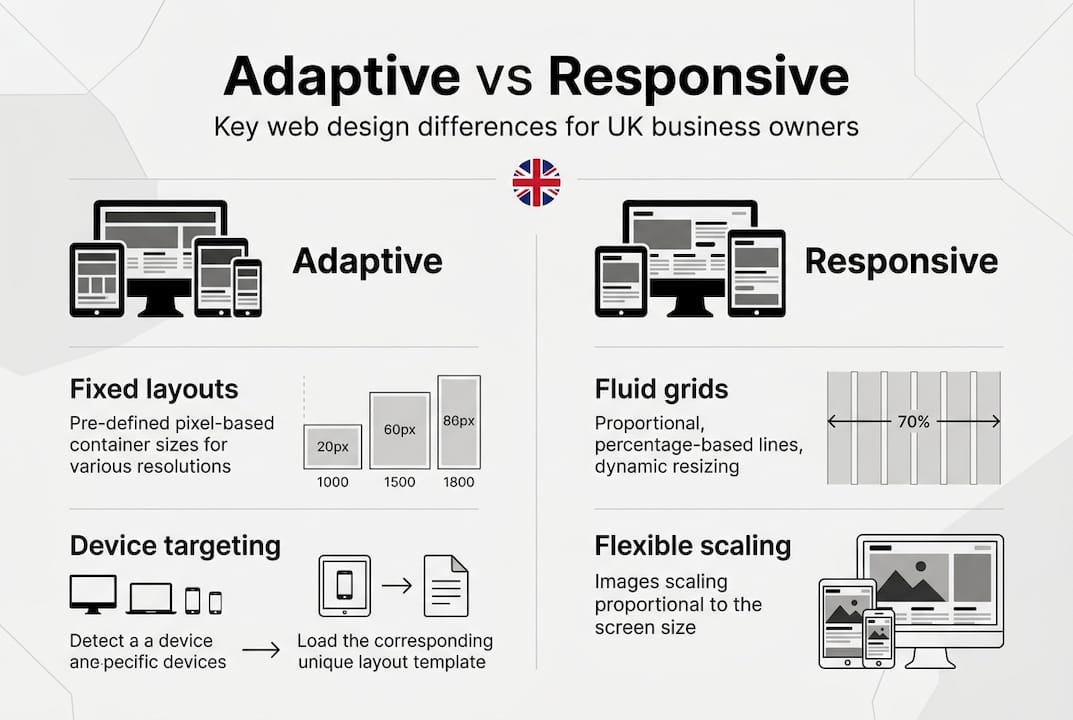
Adaptive design delivers different layouts specifically tailored to device types or screen sizes, rather than using a single flexible layout that scales continuously. When someone visits your website, the system detects their device characteristics and serves the most appropriate pre-built layout from a set of fixed designs. This differs fundamentally from responsive design’s fluid grids that adjust smoothly across any screen dimension.
The technical approach involves device or screen detection that triggers layout selection before the page loads. Your server or client-side script identifies whether the visitor uses a mobile phone, tablet, or desktop computer, then delivers the corresponding design variant. Adaptive design uses multiple fixed layouts selected based on the device, differing from the fluid grid of responsive design. Each layout is crafted specifically for its target device category, allowing precise control over every element’s placement, size, and behaviour.
This method offers several practical benefits for business owners:
- Complete control over user experience on specific devices without compromise
- Faster initial load times since only relevant layout code is delivered
- Ability to prioritise different content or features based on device capabilities
- Reduced complexity in managing layouts for dramatically different screen sizes
- Opportunity to optimise images and assets specifically for each device category
The trade-off involves creating and maintaining multiple distinct layouts rather than one flexible design. You’ll need to decide which device categories matter most to your audience and build dedicated experiences for each. Most adaptive implementations focus on three to six breakpoints covering common device types, striking a balance between customisation and maintenance effort.
Pro tip: Start by analysing your website analytics to identify which device categories your visitors actually use. Focus your adaptive design efforts on the top two or three device types rather than trying to cover every possible screen size.
Comparing adaptive and responsive design for UK businesses
Understanding the practical differences between adaptive and responsive approaches helps you make informed decisions about your website strategy. Each method solves the multi-device challenge differently, with distinct implications for development, maintenance, and user experience.
| Feature | Adaptive design | Responsive design |
|---|---|---|
| Layout approach | Multiple fixed layouts for device categories | Single fluid grid that scales continuously |
| Detection method | Server-side or client-side device detection | CSS media queries respond to viewport size |
| Development effort | Higher initial build for multiple layouts | Lower initial build with one flexible layout |
| Load performance | Faster on targeted devices with optimised code | Potentially slower with all layout code loaded |
| Maintenance | Updates needed across multiple layouts | Single codebase simplifies updates |
| Device coverage | Limited to predefined breakpoints | Covers all screen sizes automatically |
Adaptive design uses select fixed layouts whilst responsive employs fluid grids that adjust smoothly. This fundamental difference affects how you plan, build, and maintain your website. Both adaptive and responsive designs have distinct advantages; adaptive offers faster load on targeted devices whilst responsive ensures consistent experience across all screens.
The content optimisation potential differs significantly between approaches. Adaptive design lets you tailor not just layout but actual content, imagery, and functionality for each device category. You might show detailed product specifications on desktop whilst prioritising quick purchase options on mobile. Responsive design typically presents the same content everywhere, relying on layout adjustments alone to maintain usability.
Performance characteristics vary based on implementation quality. Adaptive sites can load faster on known devices because they deliver only necessary code and assets. Responsive sites must include all layout rules upfront, though modern CSS techniques have narrowed this gap considerably. The performance advantage of adaptive design becomes most noticeable on slower mobile connections where reducing payload matters significantly.
Development complexity and maintenance demands create the most significant practical trade-offs:
- Adaptive requires building and testing multiple complete layouts
- Responsive needs careful planning to ensure one layout works everywhere
- Adaptive updates must be replicated across all device-specific versions
- Responsive changes affect all devices simultaneously, simplifying consistency
- Adaptive allows isolated fixes for device-specific issues
- Responsive requires testing across continuous range of screen sizes
Your choice depends heavily on audience behaviour, available budget, and specific business goals. If your analytics show visitors concentrated on three main device types and you need maximum control over each experience, adaptive design offers compelling advantages. If you serve a diverse audience across countless devices or need to minimise ongoing maintenance, responsive design may prove more practical.
Pro tip: Consider a hybrid approach where your main layout uses responsive techniques but serves adaptive variations for dramatically different contexts like mobile apps or kiosk displays.
How adaptive design supports accessibility and user experience
Accessibility and inclusive design have become essential considerations for UK businesses, both for legal compliance and reaching broader audiences. Adaptive design offers unique opportunities to enhance accessibility by tailoring experiences to different user needs and assistive technologies.

The ability to create device-specific layouts means you can optimise navigation, font sizes, and contrast ratios for each context. Mobile layouts might feature larger touch targets and simplified navigation structures, whilst desktop versions provide comprehensive menus and detailed information architecture. This targeted approach often delivers better accessibility outcomes than trying to make one responsive layout work perfectly for every situation.
Adaptive design enables specific optimisations for assistive technologies:
- Screen reader navigation can be streamlined differently on mobile versus desktop
- Keyboard navigation patterns can match device-specific interaction models
- Alternative content can be provided based on device capabilities
- Touch targets can be sized appropriately for different input methods
- Visual hierarchy can emphasise different elements based on context
UK businesses must consider the Equality Act requirements for accessible websites. Designing for accessibility boosts UK business success by broadening audience reach and ensuring compliance. Adaptive design supports these legal requirements by allowing you to address accessibility barriers specific to each device category rather than compromising across all contexts.
The user experience improvements extend beyond accessibility compliance. Adaptive layouts let you consider device capabilities when designing interactions. Desktop users might benefit from hover states and detailed tooltips, whilst mobile visitors get tap-friendly interfaces with gestural navigation. Tablet experiences can blend elements from both approaches, recognising that these devices often serve different purposes than phones or computers.
Creating truly inclusive digital experiences requires understanding how diverse visitors interact with your website. Someone using a screen magnifier on desktop faces different challenges than someone navigating by voice commands on mobile. Adaptive design’s flexibility lets you address these varied needs without forcing every visitor through identical experiences that may not suit their context.
The business case for accessible adaptive design strengthens when you consider market reach. Approximately one in five UK residents has some form of disability, representing significant purchasing power. Accessibility business benefits extend beyond compliance to include improved search rankings, enhanced brand reputation, and access to underserved markets.
Implementing adaptive design: practical steps for business owners
Moving from concept to implementation requires systematic planning and clear understanding of your specific needs. These practical steps guide UK business owners through the adaptive design process, helping you avoid common pitfalls whilst maximising benefits.
-
Analyse your current audience device usage through analytics platforms. Identify the top three to five device categories that represent the majority of your visitors. Focus your adaptive design efforts on these primary segments rather than trying to cover every possible device.
-
Define clear objectives for each device experience. Determine what actions matter most on mobile versus desktop, and how tablet users typically interact with your content. Your goals might differ significantly across devices based on user behaviour patterns and business priorities.
-
Develop a comprehensive design brief outlining adaptive goals, target devices, and success metrics. Successful adaptive design projects require clear brief creation, appropriate technology choices, and thorough testing. Document your requirements before beginning design work to ensure alignment across your team.
-
Select suitable technology platforms and frameworks that support adaptive implementation. Consider content management systems with built-in device detection, server-side rendering capabilities, or client-side frameworks that enable efficient layout switching. Your technology choices affect both initial development and long-term maintenance.
-
Create wireframes and prototypes for each target device category. Test these early concepts with real users on actual devices to validate your approach before investing in full development. Early testing reveals usability issues and opportunities you might otherwise miss.
-
Collaborate with experienced designers familiar with adaptive techniques and UK business needs. Professional guidance helps you avoid costly mistakes and ensures your implementation follows best practices. Website design tips from experts can significantly improve outcomes.
-
Implement comprehensive testing across multiple devices, browsers, and network conditions. Don’t rely solely on emulators or responsive design mode in browsers. Real device testing uncovers issues that simulations miss, particularly around performance and touch interactions.
-
Plan for ongoing updates as device landscapes evolve. New devices, screen sizes, and interaction models emerge regularly. Build processes for monitoring device usage trends and updating your adaptive layouts accordingly.
Common challenges during implementation include managing content consistency across layouts, maintaining visual brand coherence, and coordinating updates. Address these by establishing clear content guidelines, creating comprehensive design systems, and implementing version control for all layout variants.
Pro tip: Start with a pilot project covering one section of your website rather than rebuilding everything at once. This approach lets you refine your process and demonstrate value before committing to full-scale implementation.
Budget considerations vary significantly based on project scope. Adaptive design typically requires higher initial investment than responsive alternatives due to multiple layout development. However, the performance improvements and enhanced user experience often justify the additional cost for businesses where device-specific optimisation matters significantly.
Enhance your brand with expert design services
Implementing adaptive design effectively requires both technical expertise and creative vision to deliver experiences that truly resonate with your audience. Professional design services ensure your adaptive approach integrates seamlessly with your broader brand strategy, creating cohesive digital experiences that drive business results.

Your website’s adaptive design works best when supported by strong visual branding and clear strategic positioning. How logo design will make or break your brand demonstrates the importance of cohesive visual identity across all touchpoints. A comprehensive logo design brief establishes the foundation for consistent branding that translates effectively across your adaptive layouts. Understanding the complete web design process helps you plan effectively and set realistic expectations for your project timeline and outcomes.
Frequently asked questions
What exactly is adaptive design?
Adaptive design creates multiple fixed layouts for different device categories, using detection methods to serve the most appropriate version to each visitor. Unlike responsive design’s fluid grids, adaptive delivers pre-built layouts optimised specifically for phones, tablets, or desktop computers.
How does adaptive design differ from responsive design?
Responsive design uses flexible grids and CSS media queries to adjust one layout continuously across all screen sizes. Adaptive design builds separate layouts for specific device categories and selects the appropriate version based on detection. Responsive offers broader compatibility whilst adaptive provides greater control over device-specific experiences.
What advantages does adaptive design offer UK businesses?
Adaptive design enables faster load times on targeted devices, precise control over user experience, and the ability to optimise content specifically for each device category. It supports better accessibility implementation and allows you to prioritise different features based on how visitors use each device type.
What challenges should I expect when implementing adaptive design?
The main challenges include higher initial development costs for multiple layouts, increased maintenance effort across device-specific versions, and the need for comprehensive testing on actual devices. You must also monitor device usage trends to ensure your breakpoints remain relevant as technology evolves.
How does adaptive design impact accessibility and user experience?
Adaptive design improves accessibility by enabling device-specific optimisations for assistive technologies, touch targets, and navigation patterns. It enhances overall user experience by tailoring content, functionality, and interactions to match how people actually use different devices rather than forcing identical experiences everywhere.