
TL;DR:
- Many website owners mistakenly believe that adding a padlock or generic “Secure Checkout” banner is enough to build trust. Proper placement and using verified, third-party trust badges tailored to customer anxieties are essential for boosting conversions and reducing cart abandonment. Trust badges are most effective when strategically placed near checkout and payment fields, and they must accurately represent your business practices to maintain credibility.
Most website owners assume that slapping a padlock icon or a generic “Secure Checkout” banner onto their payment page is enough to reassure shoppers. It is not. Knowing what is a trust badge — and more critically, which types work and where to place them — is the difference between a visitor who completes a purchase and one who quietly abandons their cart. This guide covers every type of trust badge, the psychology behind why they work, and the practical steps to use them without backfiring.
Table of Contents
- Key takeaways
- What is a trust badge, and what types exist?
- How trust badges work psychologically
- Where to place trust badges for maximum effect
- Common pitfalls and how to choose the right badges
- My honest take on trust badges
- Build a brand that makes trust badges believable
- FAQ
Key takeaways
| Point | Details |
|---|---|
| Trust badges signal credibility | A trust badge is a small visual symbol that reassures visitors about security, legitimacy, and business practices before they buy. |
| Badge type must match the anxiety | Different customer fears (payment security, refund certainty, legitimacy) require different badge types to be effective. |
| Third-party badges outperform self-made ones | Badges issued by independent organisations with verifiable links carry far more weight than graphics you design yourself. |
| Placement at checkout is critical | Badges shown near payment fields and checkout buttons outperform those buried in the footer. |
| Avoid unverifiable badges | Trust badges without clickable proof can increase shopper scepticism rather than reduce it. |
What is a trust badge, and what types exist?
A trust badge is a small visual symbol placed on a website to signal credibility, security, and adherence to certain standards. Think of it as a shorthand reference. Instead of asking every visitor to read your privacy policy and terms of service, a badge communicates the key reassurance in under a second.
You will also hear them called trust seals, trust signals, or security badges. The terms overlap, but there is a meaningful distinction worth understanding. A security badge specifically refers to signals about technical protection, such as an SSL padlock or data encryption indicator. A trust badge is broader. It covers payment logos, endorsement marks, review ratings, and refund guarantees too.
The main types of trust badges
Here is a breakdown of the categories you will encounter:
- SSL and security seals. These confirm your site uses encrypted connections. The browser padlock is the most recognisable example. Providers like Norton and McAfee also offer branded seals.
- Payment provider logos. Displaying recognisable logos such as Visa, Mastercard, PayPal, and Apple Pay reassures shoppers that their preferred payment method is accepted and that a reputable processor handles their data.
- Third-party endorsements. Badges from organisations like the Better Business Bureau, Trustpilot, or industry-specific trade bodies tell visitors that an external party has vetted your business.
- Money-back and refund guarantees. A badge stating “30-day money-back guarantee” directly addresses one of the most common purchase hesitations.
- Review and rating badges. Aggregated star ratings from platforms like Google Reviews or Trustpilot shown as a badge tap into social proof.
Self-made vs third-party badges
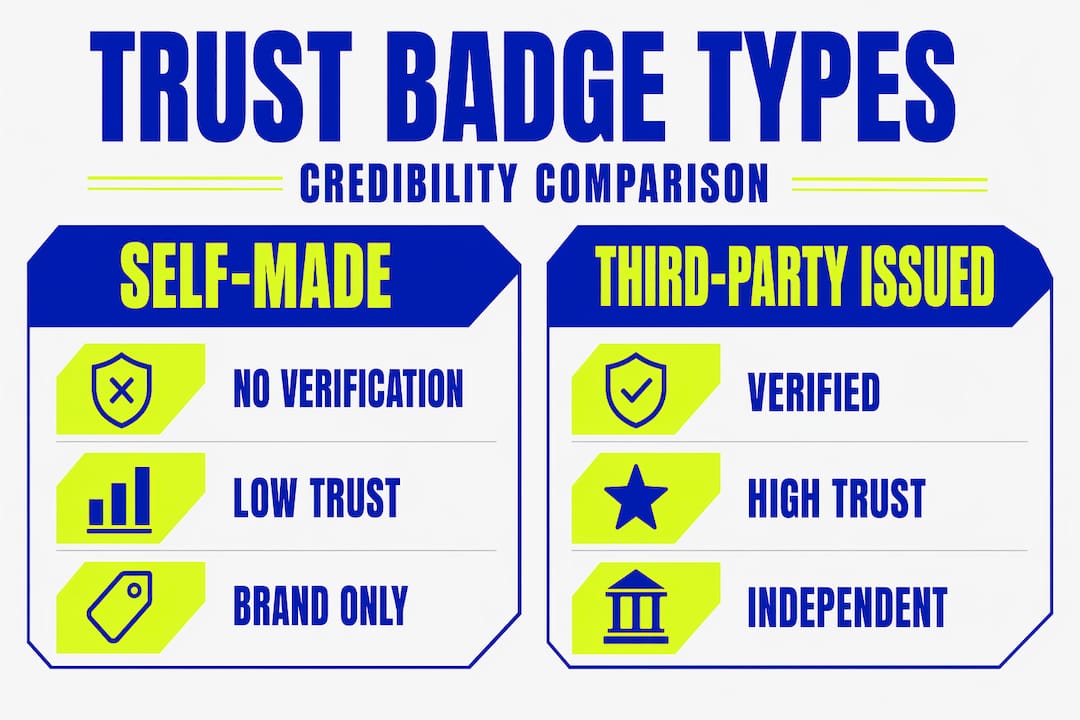
This distinction matters enormously. Badges issued by independent organisations with verifiable claims are far more credible than icons you create yourself in a graphic design tool. A self-made “100% Secure” badge carries no verification. A Trustpilot seal linked to your actual review profile carries proof.
| Badge type | Source | Verifiable? | Credibility level |
|---|---|---|---|
| SSL padlock | Browser/certificate authority | Yes | High |
| PayPal Verified logo | PayPal | Yes | High |
| Self-made guarantee badge | Business owner | No | Low |
| Trustpilot rating seal | Trustpilot | Yes | High |
| Trade body membership badge | Third-party organisation | Yes | Medium to high |
The table makes one thing clear: verification is what separates a badge that builds trust from one that raises suspicion.
How trust badges work psychologically
Shoppers do not consciously read every element of your checkout page. They scan it. And during that scan, their brain is running a rapid risk assessment. “Is this site legitimate? Will my card details be safe? What happens if I need a refund?” Trust badges answer those questions without requiring the shopper to do any research.

Trust badges act as trust signals that shift the visitor’s reliance away from your marketing claims and towards verified proof. That shift is significant. Anyone can write “We take security seriously.” A badge from a recognised authority says it without you having to.
The conversion impact is real. Research suggests that 85% of customers look for trust badges when making a purchase online. Cart abandonment is a persistent problem for e-commerce businesses, and unresolved anxiety at checkout is one of its primary causes. A well-placed badge at that exact moment can tip the balance.
Here is how the psychological chain works in practice:
- Visitor arrives at checkout. Anxiety spikes. This is where most abandonment happens.
- Visual scanning picks up a trust badge. The brain registers a familiar, authoritative symbol.
- Perceived risk drops. The shopper feels the decision has been partially validated by a third party.
- Purchase proceeds. Confidence replaces hesitation.
Different badge types address different anxieties. A payment security seal speaks to card data fears. A money-back badge speaks to commitment anxiety. A BBB endorsement speaks to business legitimacy concerns. Generic “trust me” badges are less effective precisely because they do not target a specific fear.
Pro Tip: Before selecting a badge, write down the top three reasons a first-time visitor might hesitate before buying from you. Then choose badges that speak directly to each of those hesitations.
“Reducing perceived risk is not about adding more badges. It is about adding the right badge at the right moment in the customer’s journey.” — Conversion strategy principle supported by checkout anxiety research
Where to place trust badges for maximum effect
You can have the most credible badge in your industry and still waste it completely by putting it in the wrong place. Placement is where many businesses stumble.
Trust badges are most effective at decision points, particularly near checkout and payment fields. Baymard Institute’s usability research consistently shows that badges displayed at the moment of payment entry perform significantly better than those placed in the footer or on an “About” page.
Here are the placements that consistently drive results:
- Next to the “Buy Now” or “Pay Securely” button. This is the single highest-impact location. The shopper’s eyes are already focused there.
- Near card entry fields. An SSL or security seal placed directly beside the credit card input field addresses payment anxiety at its peak.
- On product pages near the price. A money-back guarantee badge here reduces commitment fear before the visitor even reaches checkout.
- In the cart summary. A brief reminder of your security credentials as the shopper reviews their order reinforces confidence one final time.
- Header or navigation bar. For displaying established credentials like trade body memberships, this location works well as a persistent trust signal throughout the browsing experience.
What does not work: badges placed away from the payment moment consistently underperform. A footer-only placement means the badge appears after the visitor has already made their decision to stay or leave.
One more consideration is design. Make your badges clickable wherever possible. Clickable verification modals that show security scan results or business credentials dramatically reduce scepticism. A badge that leads to proof is worth ten badges that lead nowhere.
Pro Tip: Resist the temptation to display six or seven badges at once. Clutter signals desperation, not credibility. Choose three to four badges that cover your most important trust areas and present them cleanly.
Common pitfalls and how to choose the right badges
Understanding the benefits of using trust badges does not automatically mean every badge will help you. There are genuine risks in doing this poorly.
The most damaging mistake is displaying a badge that misrepresents your actual business practices. If you display a “30-day full refund guarantee” badge but your actual policy has significant exclusions, you create a trust problem far worse than having no badge at all. Shoppers who feel misled will not return.
Here is what to avoid:
- Unverifiable self-made badges. If a visitor clicks your badge and nothing happens, or they cannot confirm the claim independently, scepticism increases rather than decreases. This is sometimes called “badge scepticism.”
- Outdated certifications. An expired SSL certificate or a lapsed trade membership badge actively damages credibility.
- Irrelevant badges. Displaying a badge from an industry body your customers have never heard of adds visual noise without any trust value.
- Mismatched claims. Claiming HTTPS security when your SSL alone does not guarantee business legitimacy can mislead visitors into a false sense of complete security.
When selecting badges, work through this logic:
First, confirm the badge reflects something that is genuinely true about your business. Second, check that the issuing organisation is one your customers will recognise or can verify independently. Third, make sure the badge is linked to a live verification page or modal. Finally, assess whether the badge addresses one of the real hesitations your specific customers experience, using the right badges for your checkout anxieties rather than copying what a competitor displays.
Integrating trust badges with your overall brand trust strategy matters too. A polished, professionally designed website makes badges more believable. A poorly designed site makes even genuine badges look suspicious.
My honest take on trust badges
I have worked with e-commerce businesses and website owners long enough to notice a pattern. The ones who get the most from trust badges are not the ones who add the most of them. They are the ones who treat a badge as a promise, not a decoration.
What I have found is that layering trust signals — combining genuine encryption, third-party endorsement, and a solid reputation — does more for conversion rates than any single badge ever could. HTTPS is the baseline. It is infrastructure, not a trust statement.
The businesses that struggle are almost always the ones treating trust badges as a quick fix. They slap a padlock graphic on a page and wonder why nothing changed. Trust badges work when they are the visible tip of a credible operation. When the policies, the customer service, and the actual security underneath are strong, the badge simply confirms what the customer’s instinct is already telling them.
My advice? Before you add a single badge, look at the website essentials that build trust in your broader brand experience. A trust badge on an otherwise unconvincing website is like a quality label on a product that looks poorly made. The label does not fix the product.
— Kukoo
Build a brand that makes trust badges believable

Trust badges are only as convincing as the brand behind them. At Kukoocreative, we have spent over a decade helping business owners build visual identities that communicate credibility the moment someone lands on their site. A professionally designed logo, a consistent colour palette, and a website that looks like it belongs to a real, established business all do the quiet work of making your trust badges believable.
If you are ready to build that foundation, explore how customer logo expectations shape first impressions, or take a look at our full range of branding and design services. We would love to help you create a brand that converts visitors into confident buyers.
FAQ
What is a trust badge on a website?
A trust badge is a small visual symbol displayed on a website to reassure visitors about security, legitimacy, or business practices. Common examples include SSL padlock icons, payment provider logos, and money-back guarantee badges.
Can trust badges improve conversions?
Yes. Research shows that 85% of online shoppers actively look for trust badges before completing a purchase, and well-placed badges at checkout significantly reduce cart abandonment.
What is the difference between a trust badge and a security badge?
A security badge specifically signals technical data protection, such as an SSL certificate. A trust badge is broader and includes payment logos, third-party endorsements, review ratings, and guarantee seals.
What makes a trust badge credible?
A trust badge is most credible when it is issued by an independent, recognisable organisation and includes a clickable link to a verification page or modal. Badges without verifiable proof can trigger scepticism rather than confidence.
Where should trust badges be placed on an e-commerce site?
Place trust badges nearest to the action you want customers to take. The most effective locations are beside payment fields, next to checkout buttons, and on product pages near the price.