
Alt text is a short, descriptive piece of text attached to an image in HTML, and it does two jobs at once. It gives screen readers something to read aloud to users who cannot see the image, and it tells search engines what the image is about. Without it, a significant portion of your audience simply misses the content you worked hard to create.

The role of alt text goes beyond a technical checkbox. Around two million people in the UK live with significant sight loss, many of whom rely on assistive technologies that depend entirely on well-written alt text. Get it right, and you open your content to a wider audience while giving your search rankings a genuine lift.
Here is what alt text does in practice:
- Gives screen reader users an accurate description of image content
- Displays as visible text when an image fails to load or is turned off
- Helps search engines understand the context and relevance of your images
- Supports users with cognitive impairments by offering an alternative way to process visual information
- Contributes to WCAG 2.2 compliance and UK legal obligations under the Equality Act 2010
One rule applies from the start: never begin alt text with “image of” or “graphic of.” Assistive technology already identifies the element as an image, so that phrase wastes characters and irritates users.
Table of Contents
- How alt text works with screen readers and search engines
- Alt text best practices: the rules that actually matter
- How to write alt text for different types of images
- UK law, WCAG 2.2, and what the experts say
- Is your brand as accessible as it could be?
- Key takeaways
How alt text works with screen readers and search engines
When a screen reader reaches an image on a page, it reads the alt attribute aloud. The user hears a description in place of the visual. If the alt attribute is missing entirely, the screen reader may read out the raw file name instead, something like “IMG_4872.jpg,” which tells the listener nothing useful.
The same logic applies when images are disabled to save bandwidth, which is common on slow mobile connections. Alt text fills the gap, keeping your content coherent for every reader regardless of their connection or device.
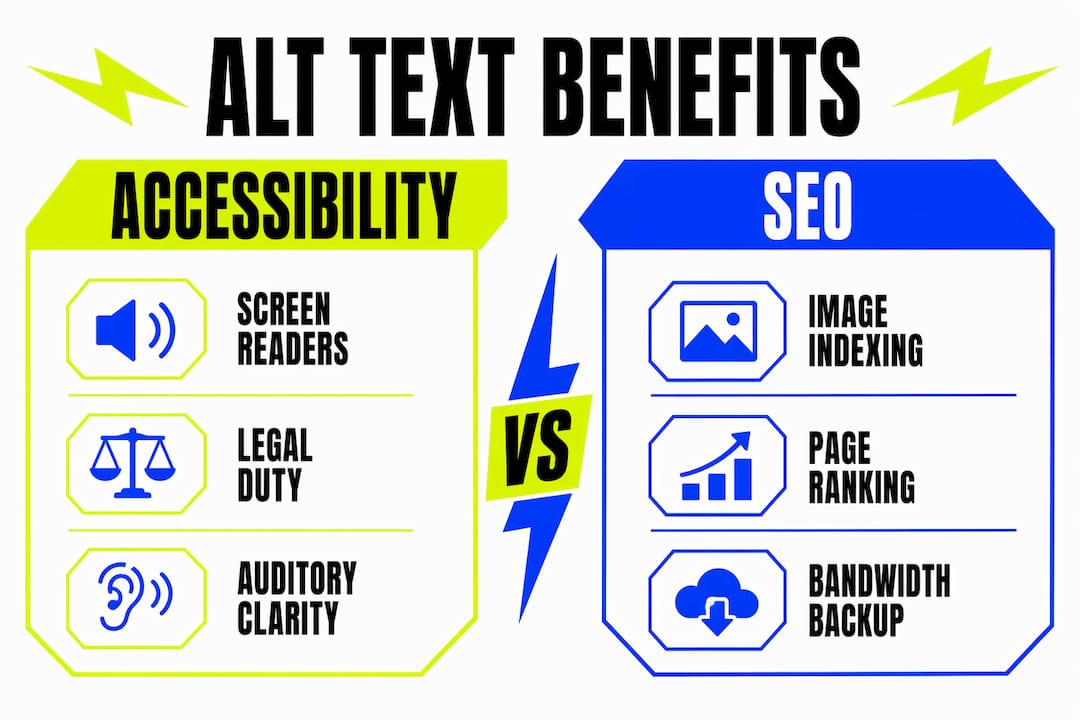
From an SEO perspective, search engines use alt text to understand what an image depicts and how it relates to the surrounding content. A product photograph with descriptive alt text can appear in Google Image Search, driving additional organic traffic. A photograph with no alt text is, to a search engine, invisible.
The RNIB figure of two million people with significant sight loss in the UK puts the scale of this in perspective. That is a substantial audience who rely on alt text every day, not a niche edge case. Accessible content is also good business, and segmenting prospects to boost professional service leads efficiently is increasingly a competitive advantage, not just a compliance matter.

Alt text best practices: the rules that actually matter
Good alt text is specific, concise, and written with the user’s goal in mind, not the writer’s desire to stuff in keywords. The UK Government Design System recommends keeping alt text to no more than two sentences, generally within 100–200 characters, and the guidance is clear: describe the meaning and context of the image, not just what it looks like.
Core rules to follow:
- Be specific. “A golden retriever catching a frisbee in a park” beats “a dog outside” every time.
- Skip “image of.” Screen readers announce the image type automatically.
- Use normal punctuation. Commas and full stops help screen readers pace the reading naturally.
- Do not duplicate captions. If a visible caption already describes the image, leave the alt attribute empty to avoid repetitive auditory output.
- Leave decorative images empty. An image used purely for visual styling should carry
alt=""so screen readers skip it entirely. - Avoid keyword stuffing. Search engines penalise alt text that reads like a keyword list rather than a genuine description.
- Match the language of the page. Alt text in a different language from the surrounding content creates confusion for both users and search engines.
One area that trips people up is hashtags in social media images. If you include a hashtag in alt text, write it in CamelCase, for example #DesignInLondon rather than #designinlondon. Screen readers read CamelCase hashtags as distinct words; lowercase runs them together into an unrecognisable string.
Pro Tip: AI tools can generate a first draft of alt text quickly, but they tend to describe images literally without accounting for context. Always review and refine AI-generated descriptions before publishing, particularly for images that carry brand or product meaning.
How to write alt text for different types of images
Not every image needs the same approach. The type of image and its purpose on the page determine how you write the alt text, and getting this wrong is one of the most common mistakes content creators make.
Informative images
These carry content that is not explained elsewhere in the text. A photograph of a product, a portrait of a speaker, or a diagram of a process all fall into this category. Describe what the image conveys in the context of the surrounding content, not just what it depicts visually.
- Good:
alt="Architect reviewing blueprints at a construction site" - Weak:
alt="person looking at paper"
Decorative images
Borders, background textures, and purely stylistic graphics add no information. Set alt="" and screen readers will skip them, keeping the experience clean and uncluttered.
Functional images (links and buttons)
When an image acts as a link or a button, the alt text must describe the action, not the visual. A logo that links to the homepage should read alt="Go to homepage", not alt="Company logo in blue and white." The user needs to know where the click takes them.
Complex images: charts, infographics, and diagrams
This is where most guidance falls short. The UK Government recommends against cramming all data into the alt attribute for complex visuals. Instead, write a brief summary in the alt text and provide a full description in the body content nearby, or link to a data table.
| Image type | Alt text approach | Example |
|---|---|---|
| Informative photo | Describe content and context | “Baker decorating a three-tier wedding cake” |
| Decorative image | Leave empty | alt="" |
| Functional (link/button) | Describe the action or destination | “Go to homepage” |
| Icon with text label | Leave empty (label does the job) | alt="" |
| Chart or infographic | Short summary, full description in body | “Bar chart showing UK sales by region, full data below” |
Pro Tip: For infographics, use a two-step approach: a short alt text description of the overall subject, then a structured text version in the page body using headings, lists, or a data table. This benefits screen reader users, magnification users, and anyone reading in bright sunlight where images are hardest to see.
Describing complex images in the main body text rather than solely in the alt attribute also reduces auditory clutter for screen reader users and benefits readers with cognitive impairments who need more time to process data. The alt text then acts as a pointer: “Flow chart for the onboarding process, full description below.”
UK law, WCAG 2.2, and what the experts say
Alt text is not optional in the UK. Under the Equality Act 2010, organisations have a legal duty to make reasonable adjustments so that disabled people can access their services. For digital content, that means meeting WCAG 2.2 standards, and alt text for non-decorative images is a core requirement of those standards.
WCAG 2.2 Success Criterion 1.1.1 requires a text alternative for every non-text element. Failing this criterion means your site is non-compliant, which carries real legal exposure for UK businesses and public sector organisations alike. The RNIB’s data on two million people with significant sight loss in the UK underlines why this standard exists.
Accessibility specialists are consistent on one point: context determines everything. There is no single formula that works for every image. The right alt text depends on the page’s purpose, the user’s goal, and what the image is actually communicating in that specific context. A photograph of a smiling team on an “About Us” page needs different alt text from the same photograph used as a testimonial illustration.
Pro Tip: When auditing your site for alt text compliance, tools such as the WAVE Web Accessibility Evaluation Tool or browser developer tools can surface missing or empty alt attributes quickly. Pair automated checks with manual review, because a tool can confirm an alt attribute exists but cannot tell you whether the description is accurate or meaningful.
At Kukoocreative, accessible design is built into every project from the start. Our team understands that design for accessibility is not a constraint on creativity; it is what makes great design work for everyone. When your images carry the right descriptions, your brand reaches further, ranks better, and serves your audience with confidence.
Is your brand as accessible as it could be?
At Kukoocreative, we build websites and brand assets that look extraordinary and work for every user. From accessible web design to logo design that makes an impact, we bring over a decade of expertise to every project. If you want your online presence to perform, connect with us and let’s build something your whole audience can enjoy.
Key takeaways
Alt text is a legal requirement under the Equality Act 2010 and a core component of WCAG 2.2 compliance, making it essential for every UK website that uses images.
| Point | Details |
|---|---|
| Alt text serves two audiences | It enables screen reader access for visually impaired users and helps search engines index images accurately. |
| Two million people in the UK | Around two million people in the UK live with significant sight loss and rely on assistive technologies that depend on alt text. |
| Keep it concise and specific | Aim for 100–200 characters, describe the image’s meaning in context, and never start with “image of.” |
| Match alt text to image type | Decorative images need empty alt attributes; functional images need action descriptions; complex images need a body-text summary. |
| Keyword stuffing harms rankings | Search engines penalise alt text written as a keyword list; natural, meaningful descriptions serve both users and SEO. |